AMAZON WEB SERVICES · S3 CONSOLE
ROLE
Lead UX designer
TEAMS
S3 (Simple Storage System)
OpenSearch
Bedrock
TIMELINE
9 months
2024–2025
Preview → GA at re:Invent 2025
SCOPE
UI/UX Design
Information Architecture
Cross-service Integration
OUTCOME
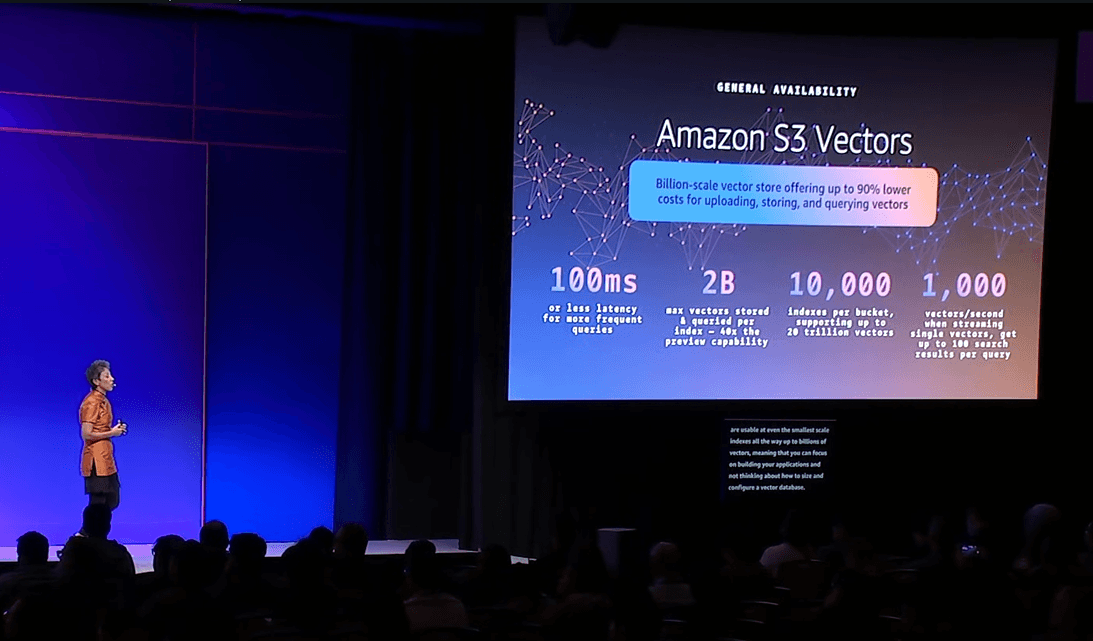
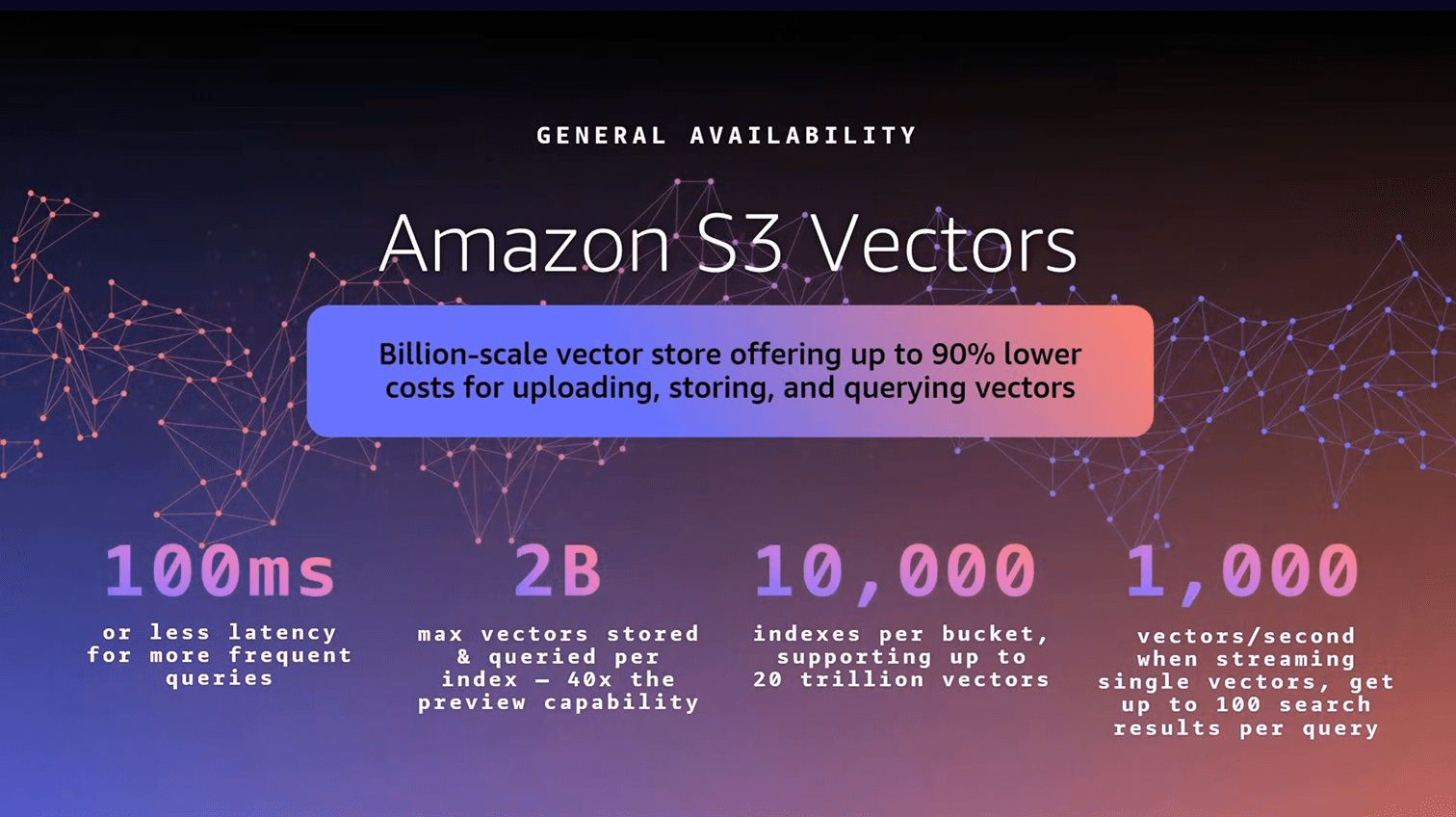
Shipped GA at re:Invent 2025. Up to 90% lower cost vs. dedicated vector DBs. Preview customers include ITV, Paramount, Natera, JPMorgan Chase.
HIGHLIGHT
Cost-optimized AI-ready storage with native support for storing and querying vectors at scale
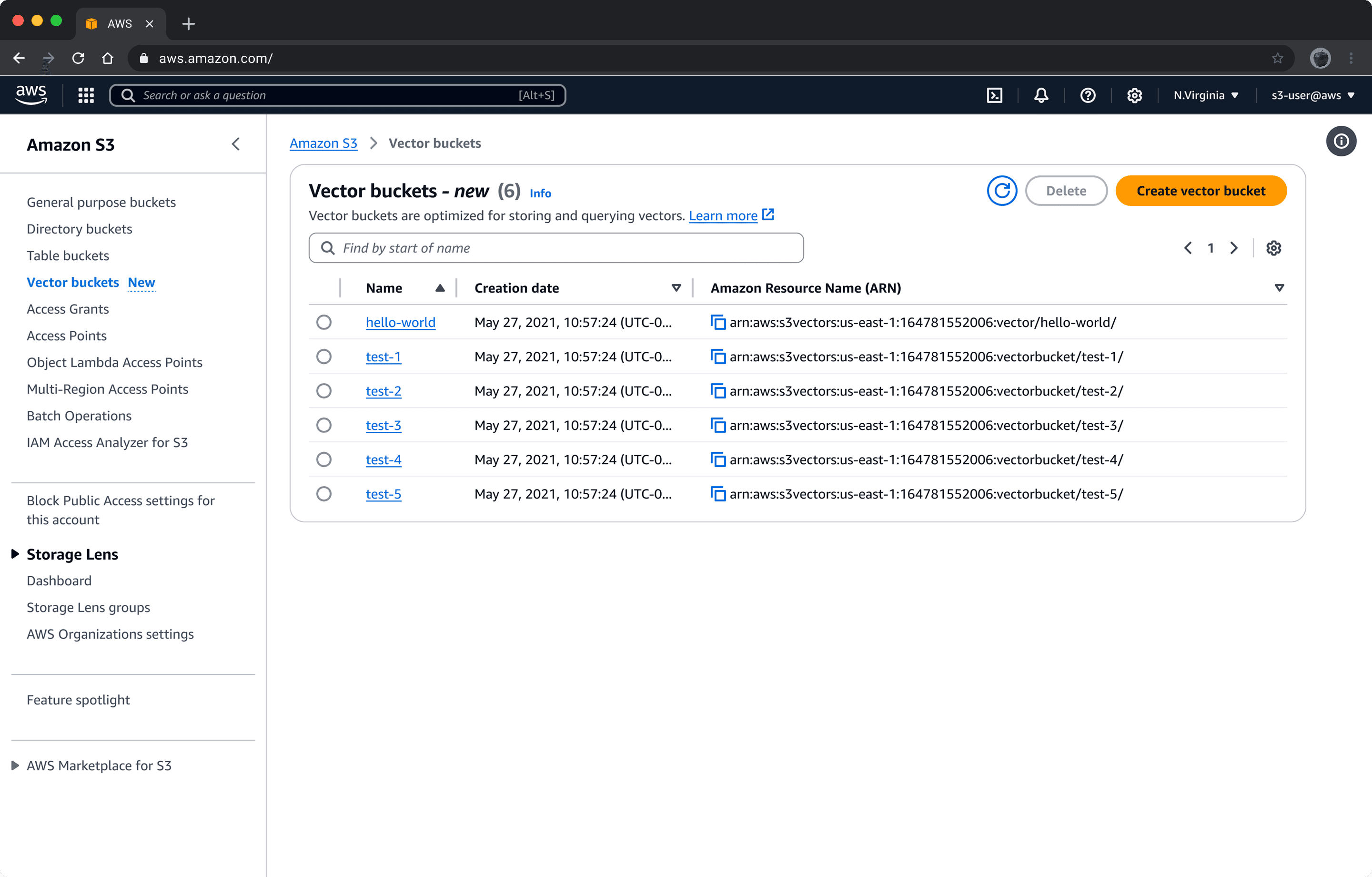
2.0 Vector bucket list - A separate list view from general-purpose S3 buckets. We chose visual separation over a unified list to reinforce that vectors and objects have different lifecycles.
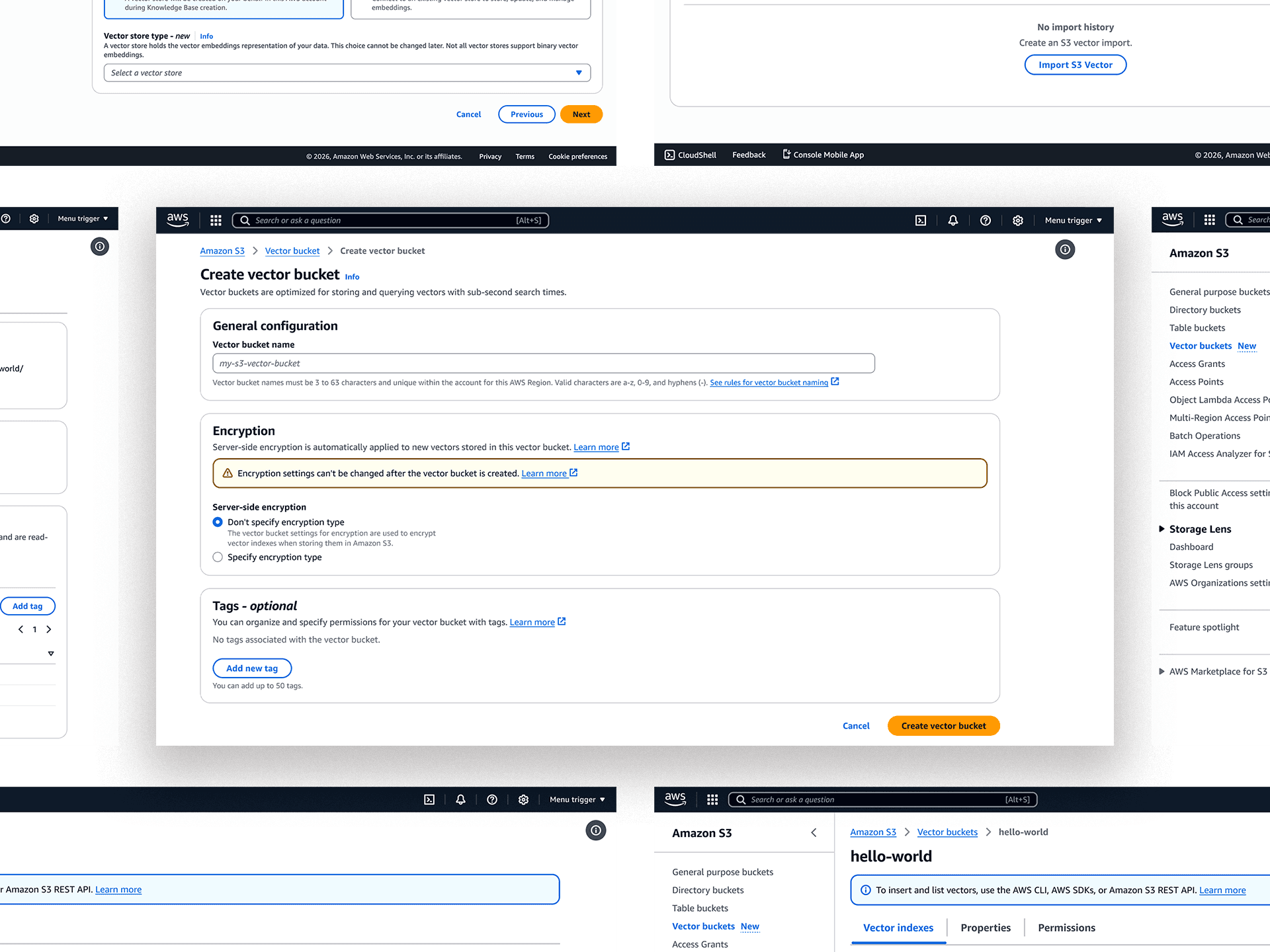
2.1 Create vector bucket — Single-page form, no wizard. Research showed users wanted to see the full mental model upfront rather than be guided through it.
2.2 Vector bucket tabs
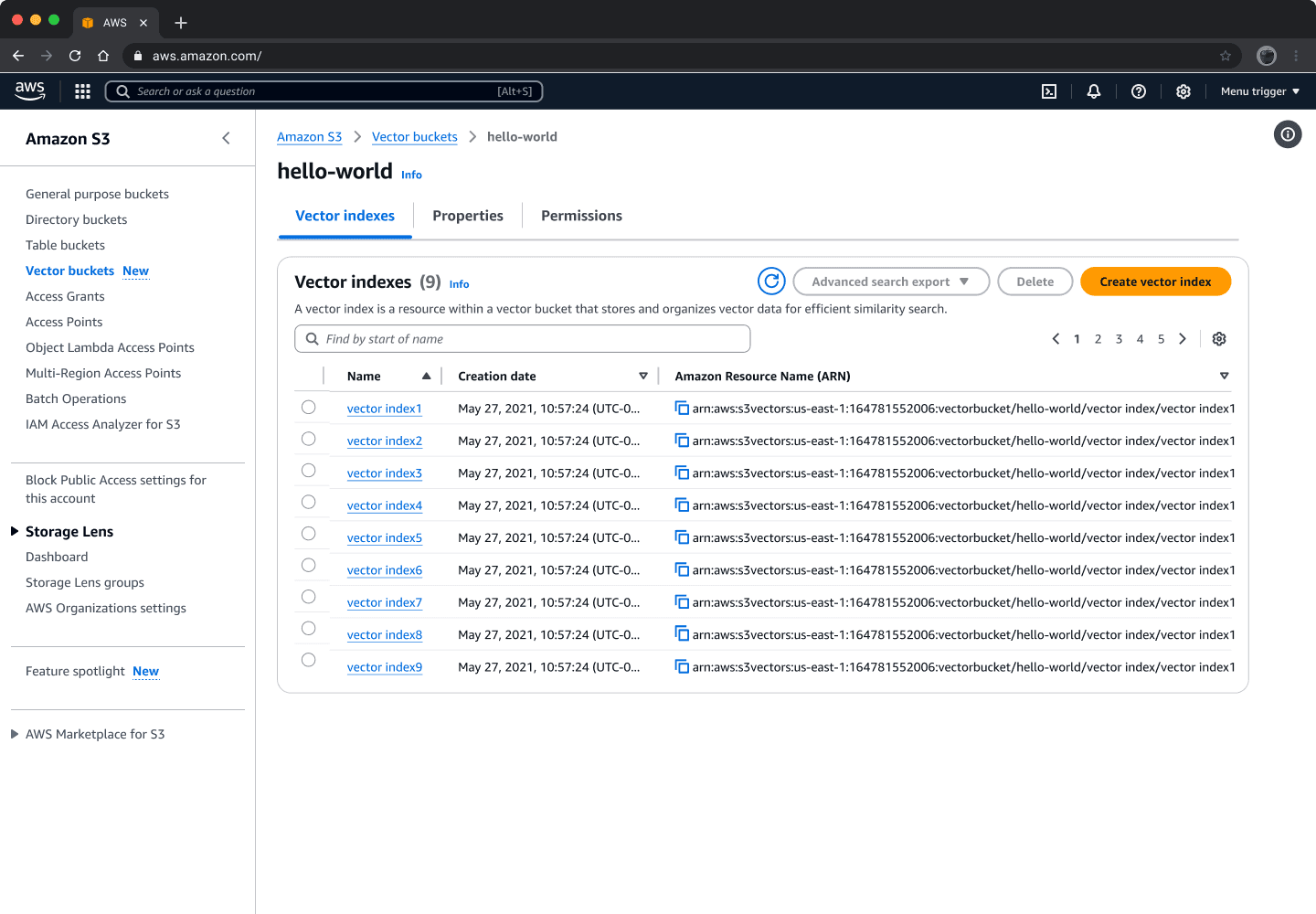
2.3 Vector index list — Nested inside the bucket detail page. Reinforces the resource hierarchy: buckets contain indexes, indexes contain records.
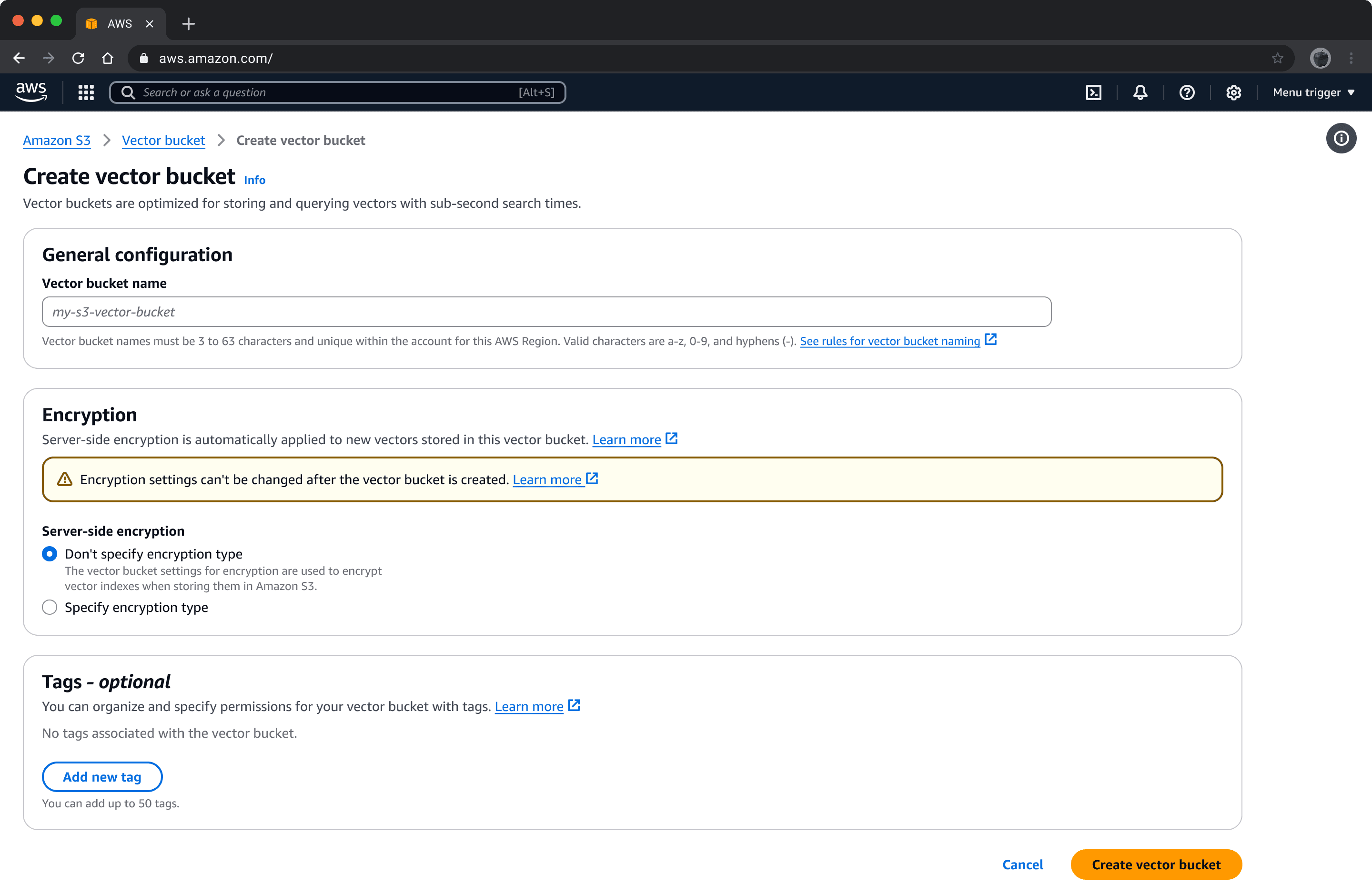
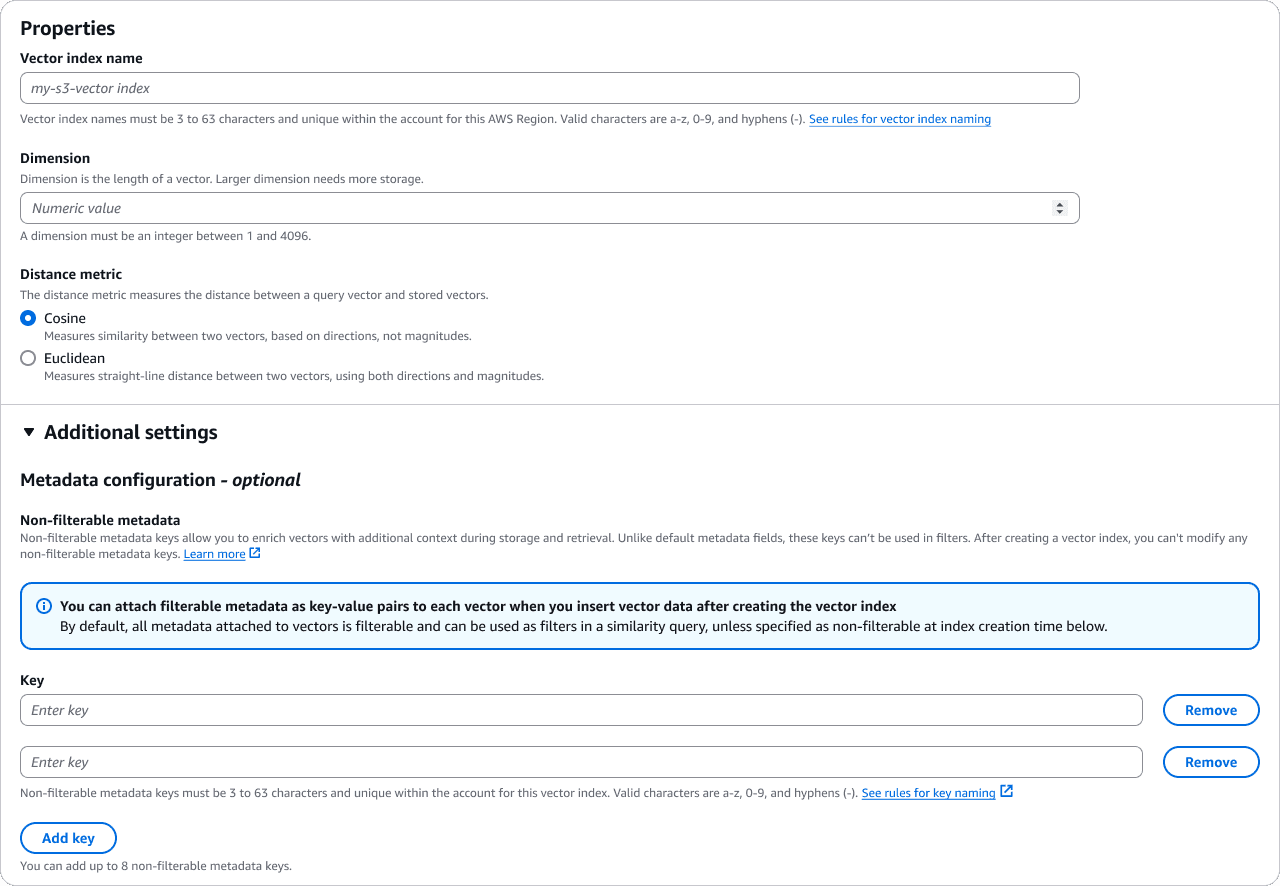
2.4 Create vector index — Note the inline explainers on dimension and distance metric. Both are immutable post-creation, so the form invests heavily in upfront comprehension.
2.5 Delete vector bucket — Modal overlay rather than dedicated page (vs. general-purpose S3). The bucket list stays visible; type-to-confirm replaces multi-step navigation.
CONTEXT
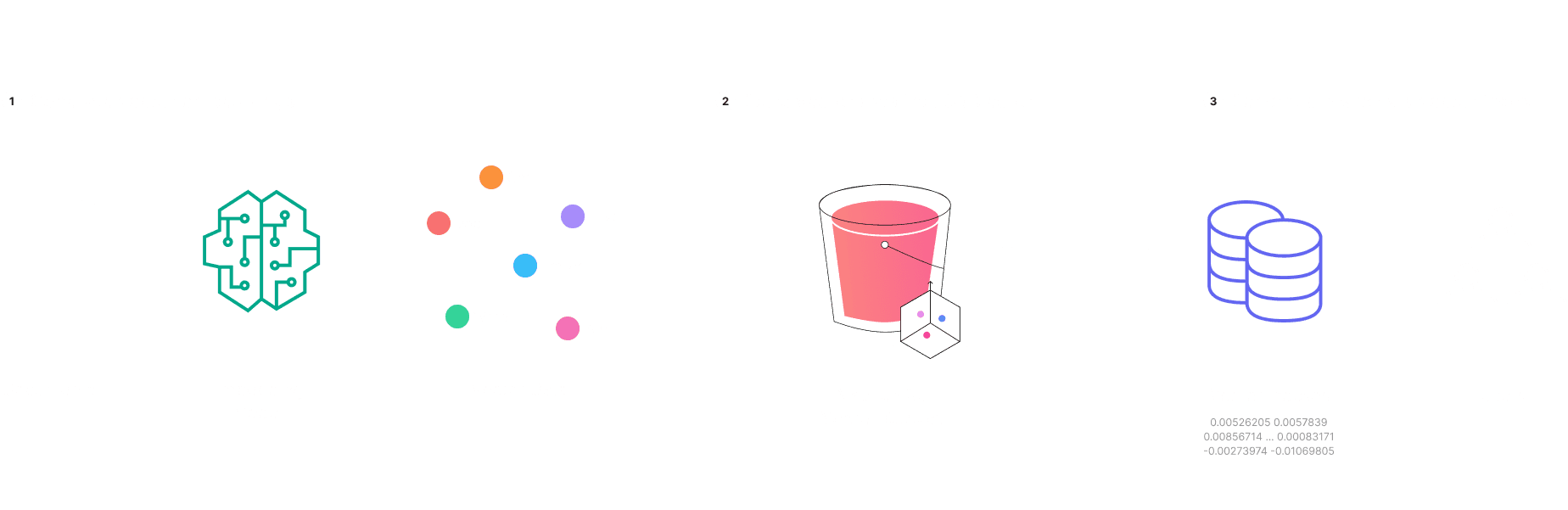
What is Amazon S3 Vectors?
Amazon S3 Vectors is a feature that allows you to store and search vector data directly inside Amazon S3. instead of moving data to a separate database, you can manage vectors natively alongside your other S3 content.
PROBLEM SPACE
Before S3 Vectors: Traditional Vector Database Options
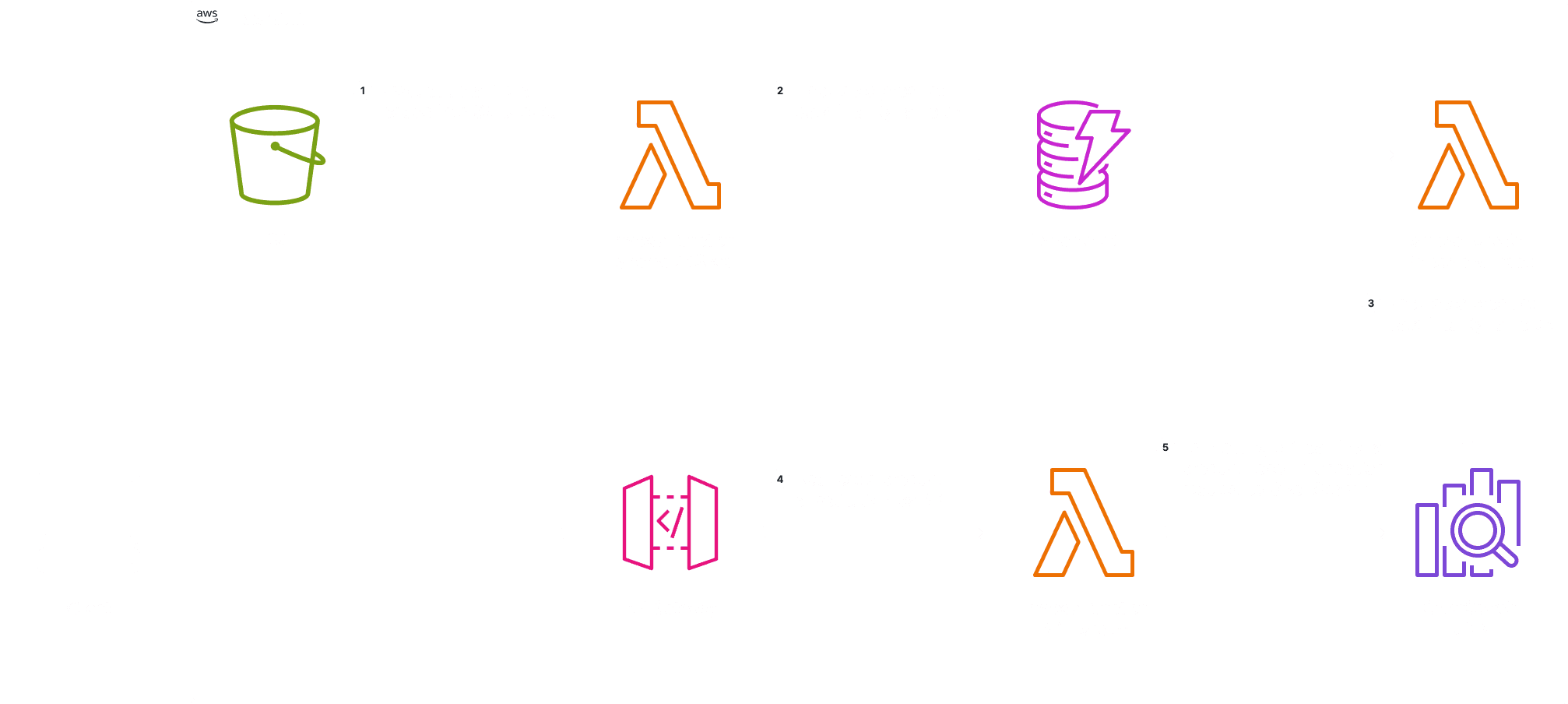
OpenSearch Serverless + k-NN plugin
A managed cloud search service that finds similar items (like related products or content) using AI-powered vector matching.
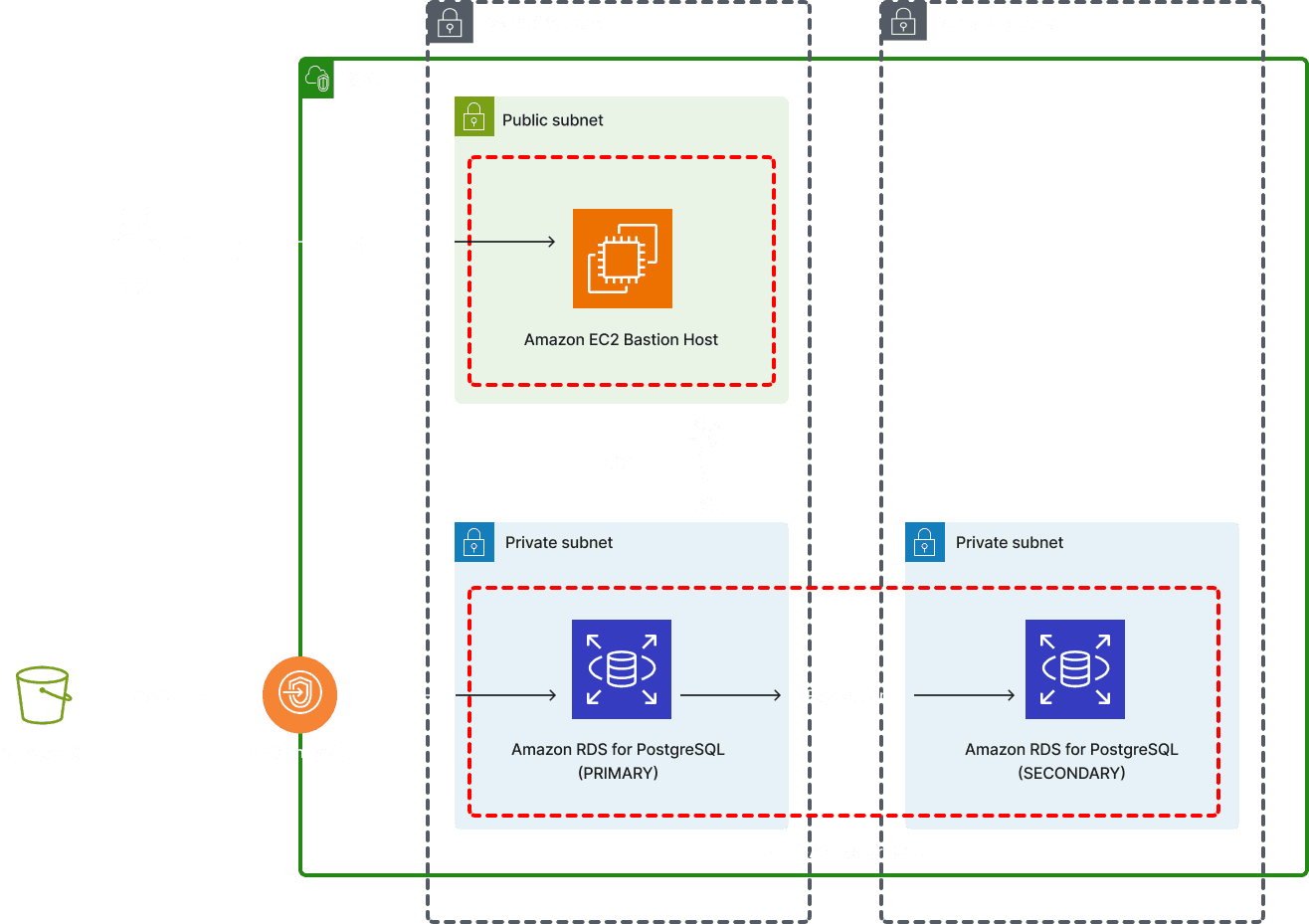
Amazon RDS for PostgreSQL + pgvector
A managed PostgreSQL database with a built-in extension for storing and searching AI-generated vectors.
2.6 Delete vector bucket
INTERACTIVE
They all work great… but they come with operational overhead and cost, especially at low to medium scale companies.
The cost problem at scale
Dedicated vector DB
Baseline compute + RAM + licensing
S3 Vectors
Up to 90% lower cost — pay per use
Example: 10M vectors, 1M queries/month
Storage $3.50
Writes $14.75
Queries ~$4.00
< $25/month total
What if the world’s most durable, cheapest, and most scalable storage service… just became a vector database?
RESEARCH SUMMARY
On a platform built for objects, vector data is a completely different mental model.
S3 was designed around objects: upload files, download files. Vector data doesn't work like that. You write records, query by similarity, and never download the whole index. Existing vector databases solved search — but their cost model was broken at scale: baseline compute running 24/7, RAM requirements reaching hundreds of gigabytes, enterprise licensing that charged for every query and backup.
ML ENGINEERS
No console visibility into vector infrastructure
At preview, everything was CLI and SDK only. No way to see indexes, check status, copy an ARN, or audit a config without running terminal commands.
PLATFORM TEAMS
Cross-service wiring was entirely manual
Connecting a vector index to OpenSearch for high-QPS hybrid search required provisioning an OSI pipeline, AOSS collection, and IAM roles — by hand, across three separate consoles. No guardrails, no defaults.
DATA SCIENTISTS
No guidance on configuration tradeoffs
Distance metric, dimensionality, metadata filterability — these decisions have major downstream consequences. Wrong choices didn't throw errors immediately; they caused silent degradation in search quality weeks later.
"Customers like ITV, Paramount, Natera, JPMorgan Chase want a 'click-and-embed-a-bucket' experience that gives them always-on semantic search across a range of data types."
— S3 Vectors customer insight report, 2024
THE OPPORTUNITY
Transform vector infrastructure management into a native S3 experience.
I designed the end-to-end console experience for vector buckets and indexes — from the create wizard to the detail page — and collaborated with adjacent service teams on the OpenSearch integration flow and the Bedrock Knowledge Base selection experience. The goal: make operational tasks fast, configuration decisions clear, and integration paths seamless.

APPROACH & STRATEGY
Scoping the Chaos
S3 Vectors launched at the intersection of three existing AWS teams — S3, Bedrock Knowledge Bases, and OpenSearch — each with their own console surfaces, API contracts, and design systems. The design space was enormous. The question was simple: where do you start?
Phase 1
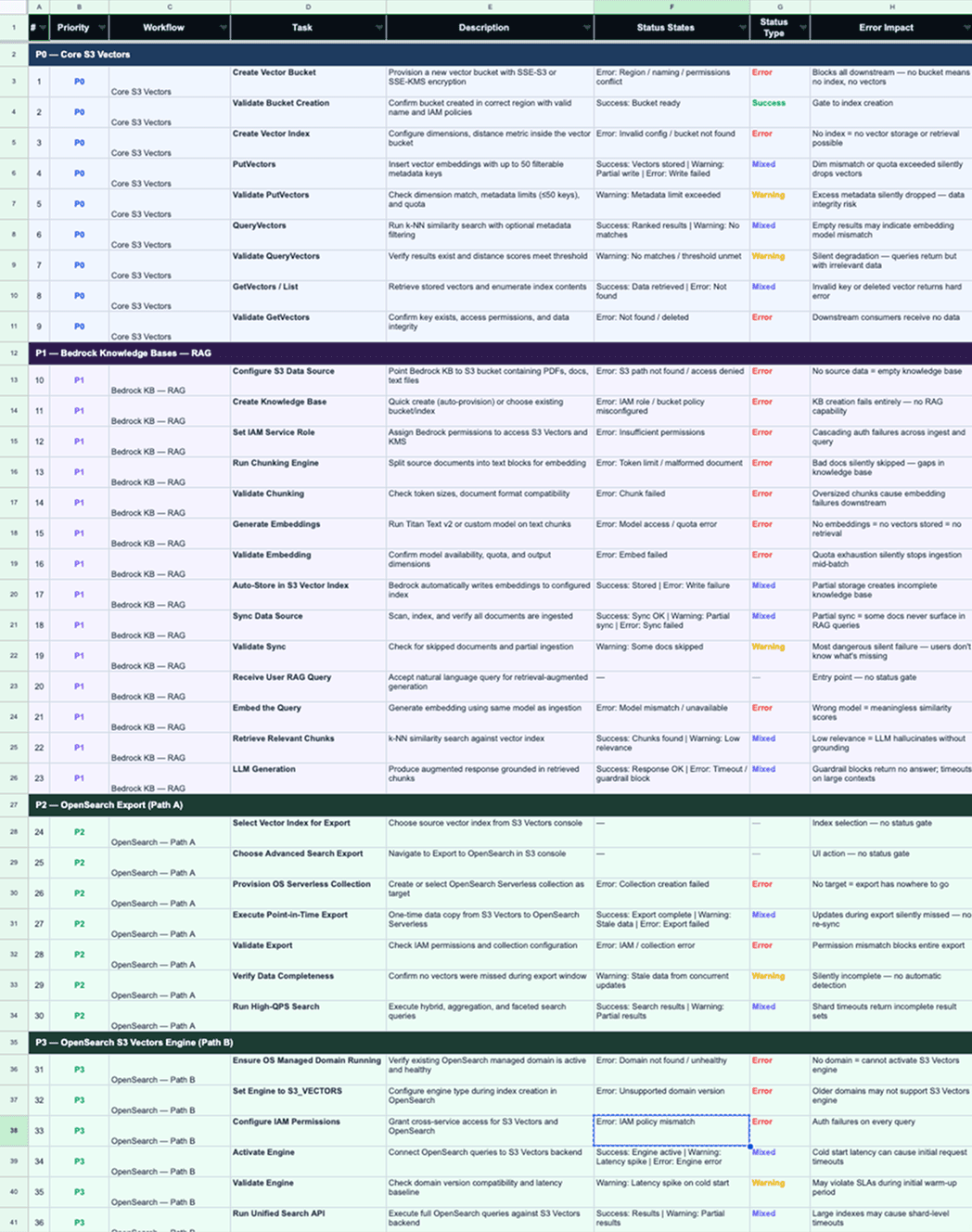
Mapping the work
First week, no design tools. My PM and I pulled apart docs, API specs, and console flows from S3, OpenSearch, and Bedrock — looking specifically for what broke at the handoffs between them. The output: 49 tasks across 3 service teams, sorted into 6 priority tiers.
Phase 2
Cross-Team Design Collaboration
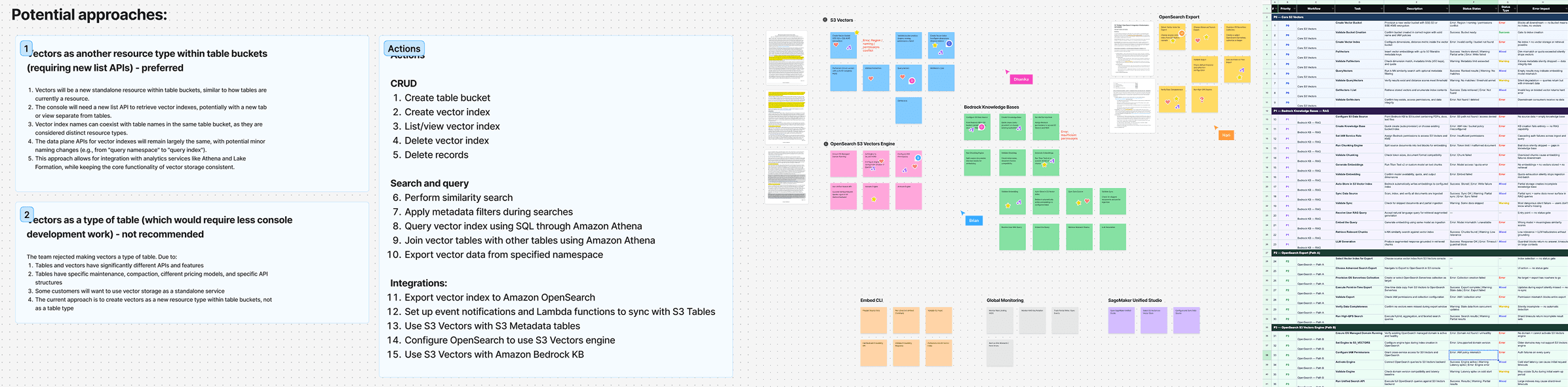
Three teams, three roadmaps, three opinions about where each service ended. I ran a weekly 30-minute working session — not a status meeting — screen-sharing the evolving flow chart so we could resolve handoffs in real time.
Example: OpenSearch wanted vector export configuration to live entirely in their console — cleaner boundary, easier maintenance. I pushed back: user research showed customers start with their data, not their query engine. We embedded OpenSearch's configuration UI inside the S3 console, with a change-notification protocol so their team could update fields without breaking ours.
Phase 2
Decision Making
This project had dozens of design choices. Three of them were structural—they constrained every decision that followed. I'm showing these because the judgment calls mattered more than the pixels.
How should vectors live inside S3's existing model?
S3 has one of the most deeply entrenched mental models in cloud computing: buckets contain objects. Vectors aren't objects—they're records with embeddings, metadata, and distance metrics. The fundamental question was whether to extend the existing model or introduce a parallel one.
REJECTED — EXTEND THE OBJECT MODEL
Treating vectors as S3 objects reuses existing UI and feels familiar—but it's the wrong metaphor. Vectors aren't objects: they have immutable dimensions, fixed distance metrics, and are queried by similarity, not by key. The familiar surface would create unfamiliar confusion.
CHOSEN — NEW RESOURCE HIERARCHY
Make vectors their own thing: Vector Buckets → Vector Indexes → Records. A separate listing page, separate creation flow, separate vocabulary. No borrowed metaphors—just space to teach dimensions, distance metrics, and similarity search on their own terms.
TRADEOFF
Adding a "Vector" tab to existing bucket pages saves build time and feels familiar—but vectors aren't objects. They have immutable settings and are queried by similarity, not by key. Familiar surface, wrong mental model.
Should cross-service flows leave S3, or should we bring them in?
The highest-value workflow for vector storage is hydrating data into OpenSearch for millisecond-latency hybrid search. This involves configuring IAM roles, OpenSearch collections, and index mappings—concepts that belong to OpenSearch, not S3. We had to decide where this configuration lives.
REJECTED — DEEP LINK TO OPENSEARCH CONSOLE
A "Set up in OpenSearch" button keeps service boundaries clean and is simpler to build—but it breaks the flow. Users lose context, have to re-orient, and often don't come back.
CHOSEN — BRIDGE EXPERIENCE WITHIN S3
An embedded panel lets users configure OpenSearch—IAM roles, collection params, all of it—without leaving S3. Each step explains what it does and why. No context switching, no drop-off.
TRADEOFF
This introduced coupling—S3 now contains OpenSearch configuration UI. We accepted it because task completion mattered more than clean service boundaries, and coordinated with the OpenSearch team on a change notification protocol to manage the risk.
03
What should we cut from launch to ship on time?
Nine months for a 0-to-1 console at AWS is tight. Midway through, it became clear we couldn't ship every feature at full quality simultaneously. I advocated for a phased launch over a delayed launch.
REJECTED — FULL FEATURE LAUNCH
Ship every feature — core CRUD, tagging, KMS encryption, OpenSearch integration, Bedrock KB integration — together at GA. Cleaner story, single launch event, no "coming soon" gaps. But it would have pushed launch 3–4 months past re:Invent and missed the strategic window for the first-ever cloud-native vector store.
CHOSEN — PHASED ROLLOUT WITH INDEPENDENT VALUE
1: Core CRUD (create/review/update/delete).
2: Tagging + KMS encryption.
3: OpenSearch and Bedrock KB & RAG integration. Phase 1 alone was enough to build a complete vector workflow.
TRADEOFF
Enterprise customers felt the gaps early. We offset this with "Coming soon" indicators and CLI docs—betting that early signal from real customers was worth shipping before it was polished.
Phase 4
Building While Learning
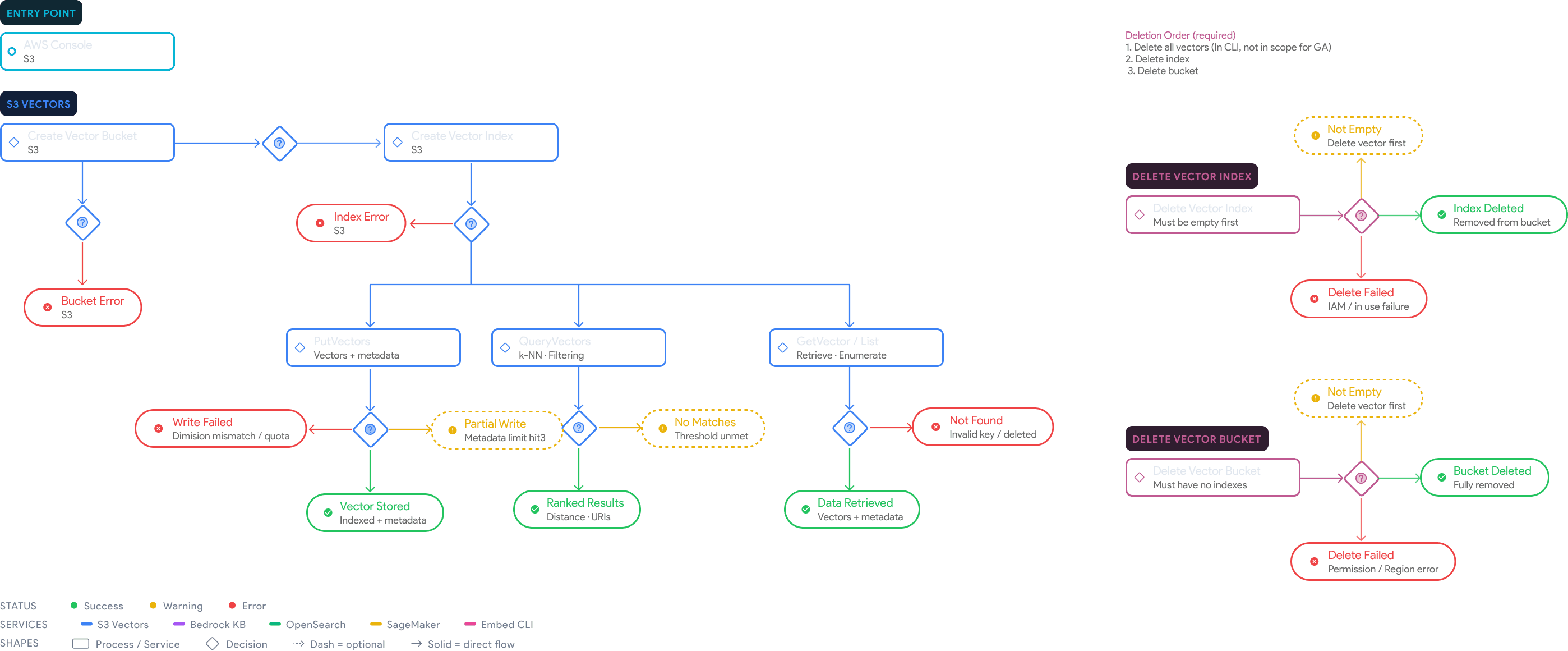
The flow chart became the project's source of truth — used by PMs for alignment, engineers for implementation, and design leads for coordination across services. Four iterations to get there: flat steps → branching decisions → success/warning/error states at every gate → interactive tab navigation by team scope.
A/B TESTING & DESIGN EXPLORATION
Creation flow — A question of orchestration vs. autonomy.
Two patterns were explored for vector bucket creation:
Flow A (Multi-step wizard): Bundled bucket and index creation into a sequential flow with a step indicator. While it felt guided, it introduced navigational overhead and obscured the fact that buckets and indexes are independent resources with separate lifecycles.
Flow B (Single-page forms): Treated each resource creation as a self-contained action. Users create a bucket, see it in the list, then optionally create an index — preserving their mental model of the resource hierarchy.
Flow B was chosen for its resource independence, clearer information architecture, and reduced engineering overhead.
Flow A
Flow B
Single page creation
Step 1: Create vector bucket
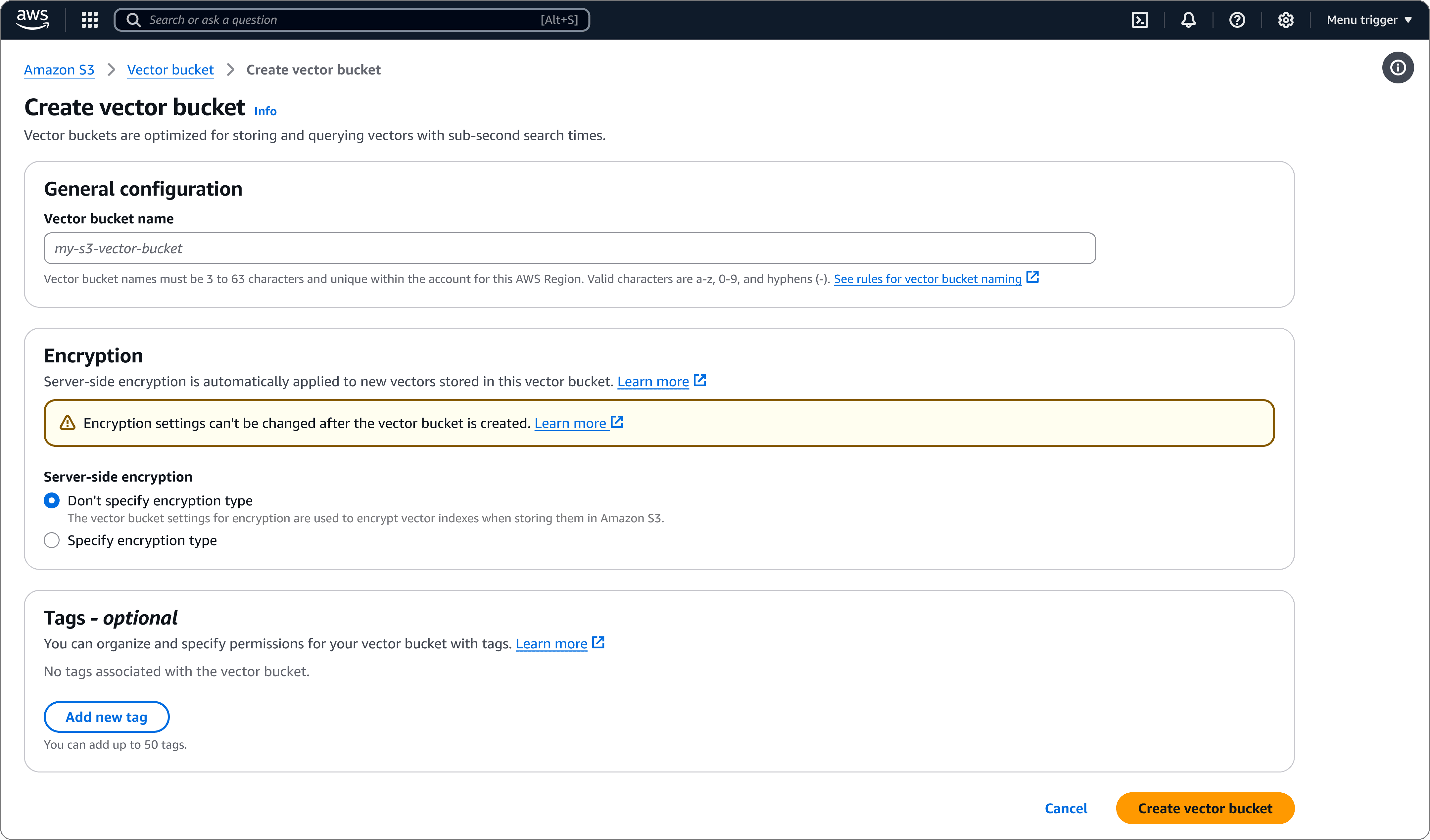
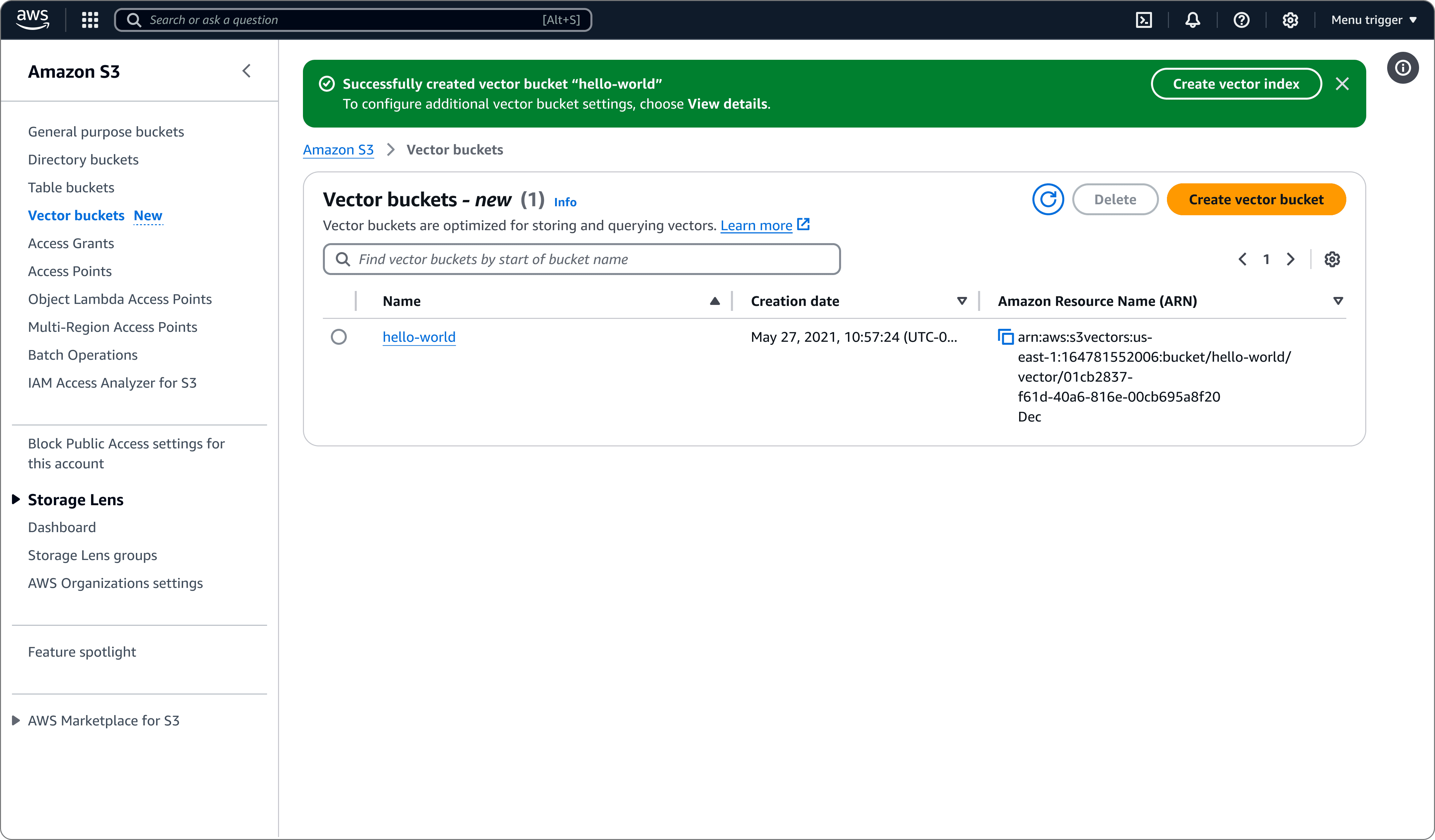
All fields visible at once — complete mental model upfront, one form, one action
No wizard overhead — no step state, inter-step validation, or draft persistence
Returns to the list view with a success flashbar and a contextual "Create vector index" CTA — natural next step without forcing it
No progress indicator, but the form is short enough that one would be over-engineering
Step 2: Create vector index
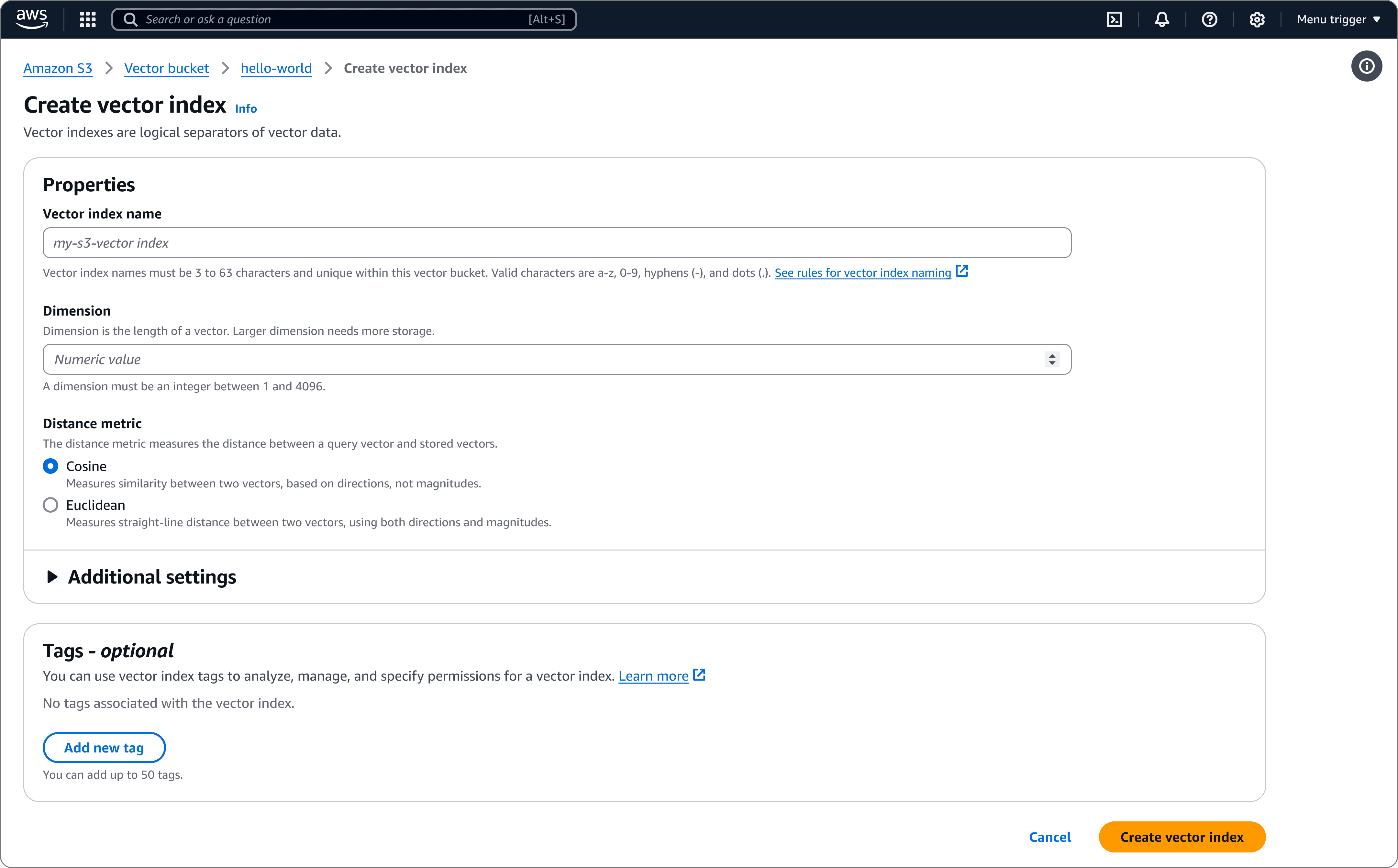
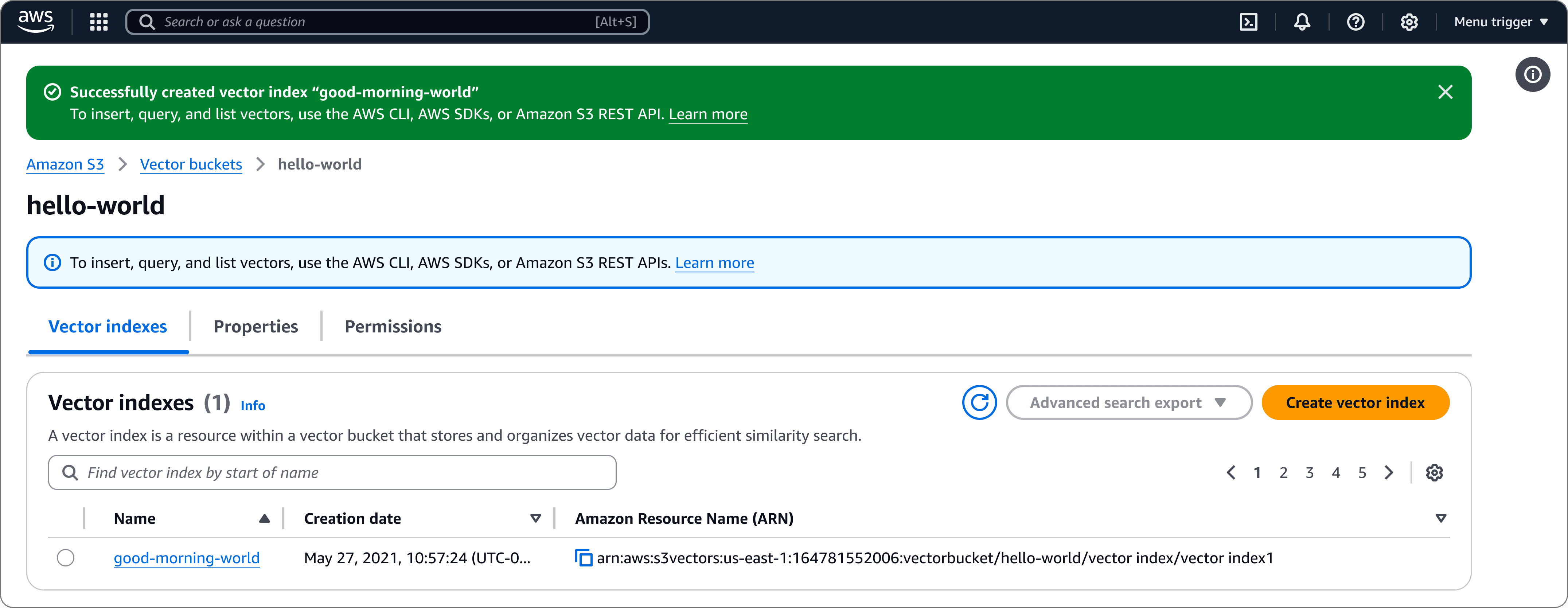
Breadcrumb reflects the resource hierarchy — the user knows they're creating an index inside a specific bucket.
Decoupled from bucket creation — accessible from the bucket detail page at any time, serving both first-time and returning users.
Lands on the bucket detail page post-creation, building familiarity with the actual workspace rather than a throwaway summary.
Deletion flow divergence
When designing S3 Vectors, I chose not to reuse the existing bucket deletion pattern. On the surface this looks inconsistent — but it reflects real engineering constraints and data model differences that made a unified flow either technically impractical or semantically misleading.
CONSTRAINT 1
No empty vector bucket API
The bulk clear infrastructure simply didn't exist at launch; building it for preview wasn't scoped.
CONSTRAINT 2
Vectors aren't objects
Different data model, different API surface, can't be deleted via DeleteObjects
CONSTRAINT 3
Operational risk
Indexes may represent significant compute investment; forcing explicit acknowledgment per index reduces accidental loss
General-purpose S3 navigates users away from the bucket list to a dedicated deletion page. It's thorough — room for warnings, object counts, metadata — but costly. The user loses context, and if the deletion fails (non-empty bucket), they must resolve the issue and navigate back.
S3 Vectors replaces this with a modal overlay. The bucket list stays visible. The user types the bucket name to confirm, hits delete, and the interaction resolves in place — no navigation, no round-trip.

Bedrock KB & RAG — Quick create
Amazon Bedrock's Knowledge Base feature lets customers connect S3 documents to a RAG pipeline — enabling AI applications to retrieve and generate grounded answers from proprietary data. But getting there meant navigating choices most builders weren't equipped to make: which embedding model, what chunk size, which vector store to provision.
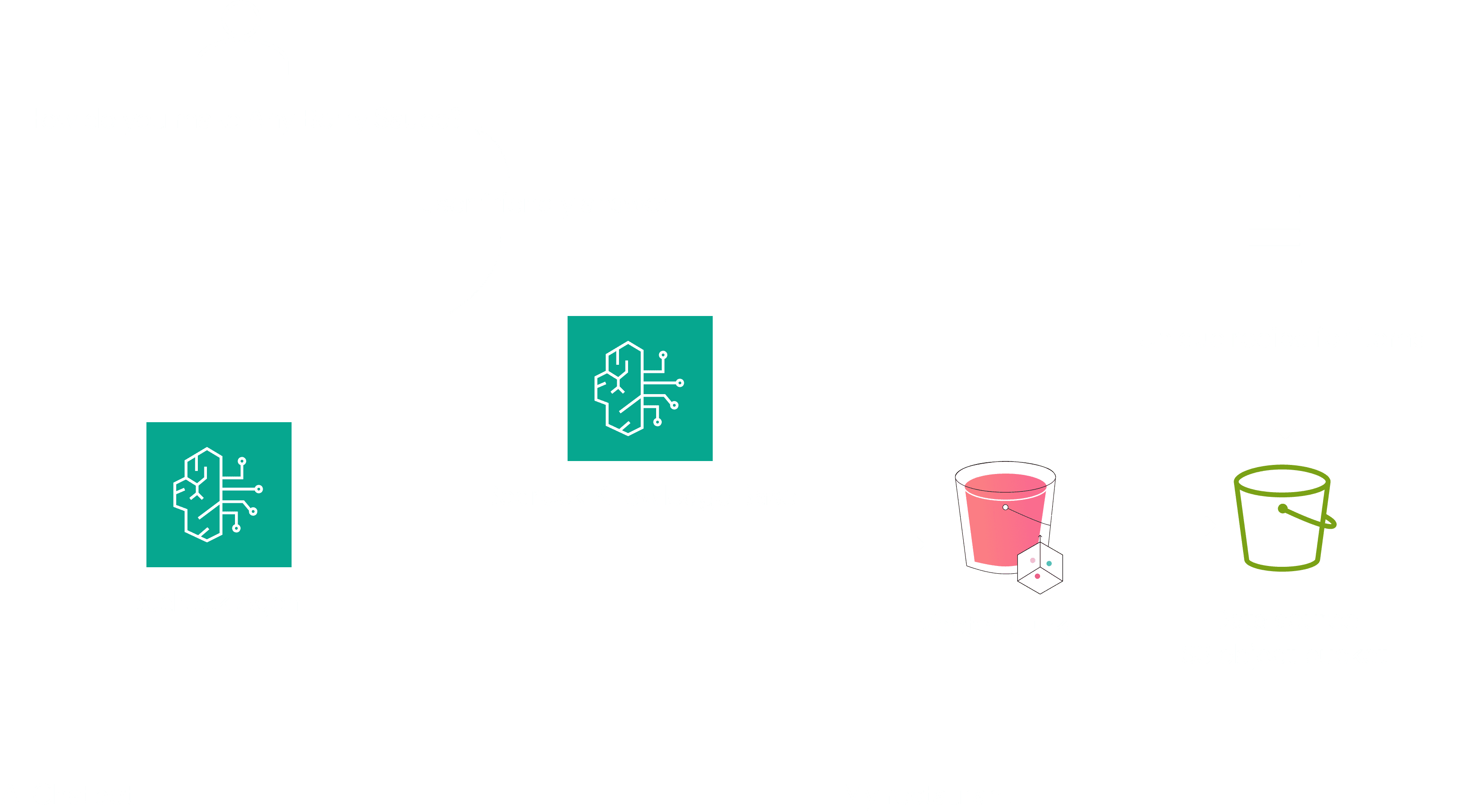
The original flow asked users to become infrastructure engineers
BEFORE - STANDARD CREATE
Name your knowledge base + configure IAM role
Select data source type
Choose embedding model + set dimensions
Select and provision a vector store (OpenSearch, Aurora, Pinecone…)
Configure chunking strategy + overlap percentage
Review + create + manually sync
AFTER - QUICK CREATE
Name your knowledge base
Select your S3 bucket
Select Quick Create — everything else is handled automatically
Review + create + auto sync
Decisions that made Quick Create possible
01
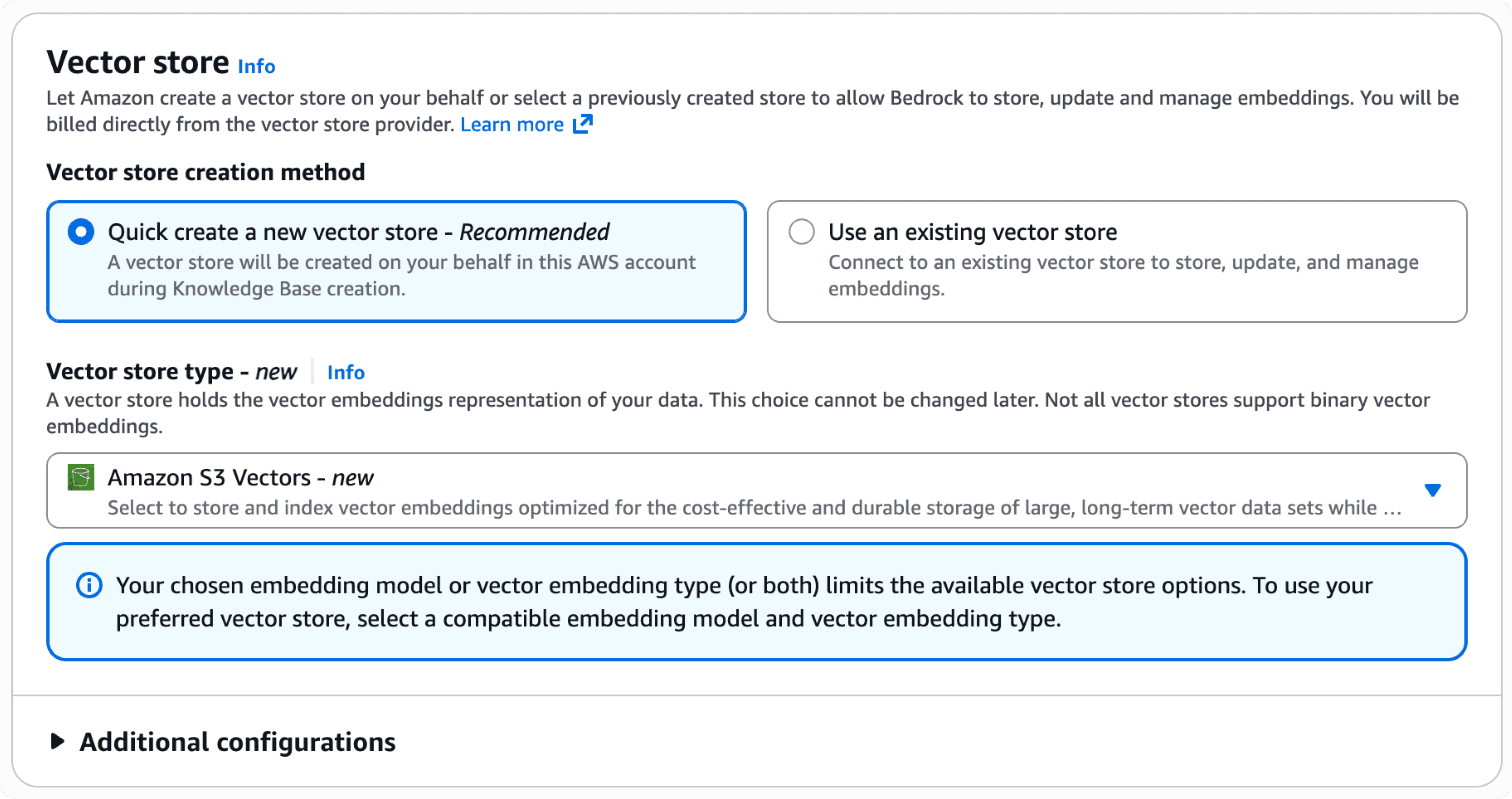
Auto-select S3 Vector Buckets as the default vector store
The biggest friction point was vector store selection — users had to choose between OpenSearch, Aurora, Pinecone, and others without knowing what any of them meant.
I worked with the ML team to establish S3 Vectors as the safe, cost-effective default for first-time users, eliminating the decision entirely. It only surfaces as a choice in the advanced path.
02
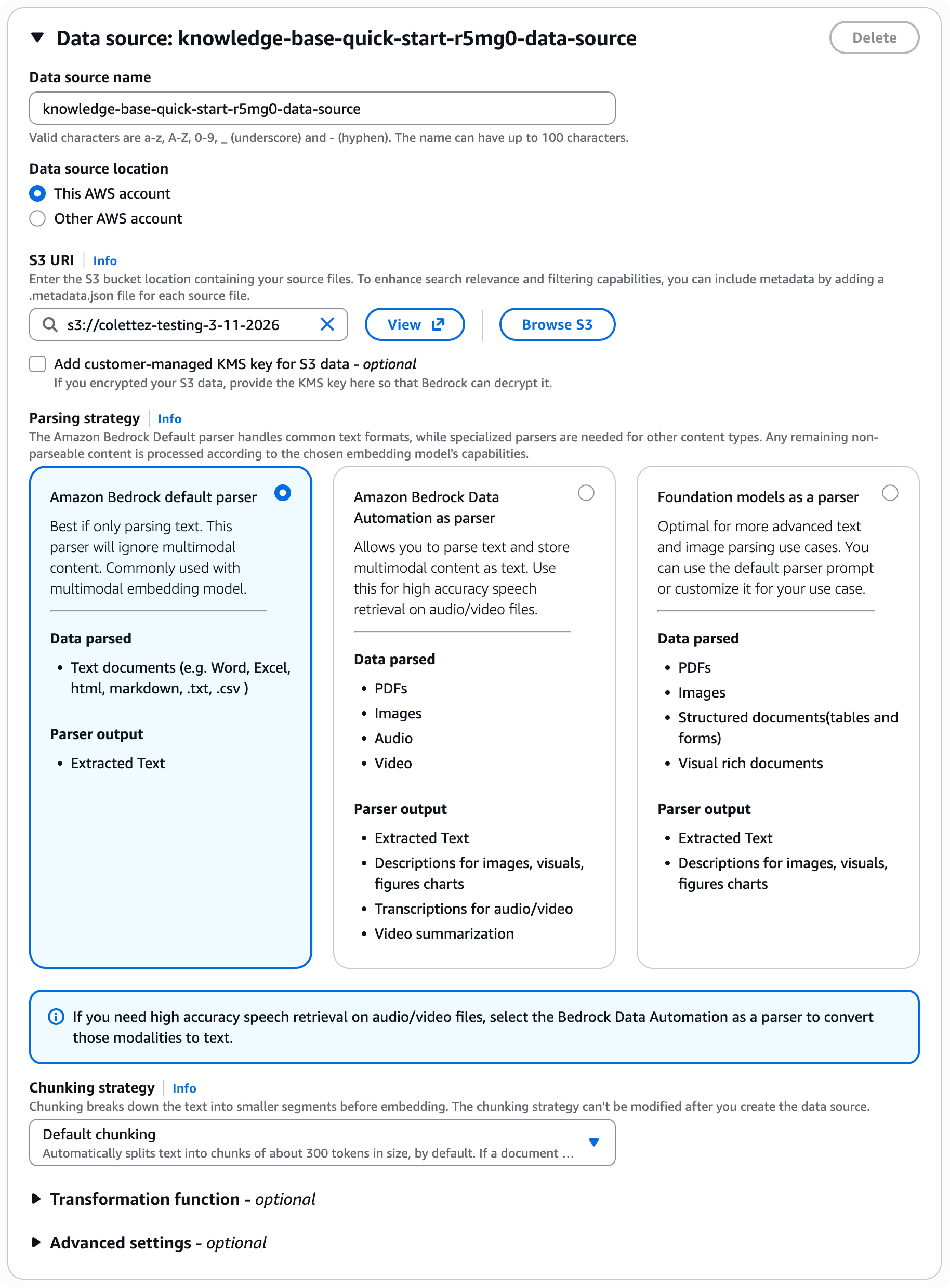
Apply opinionated defaults for parsing and chunking
Together with the ML team, we identified the parsing and chunking configuration that works for the widest range of use cases. These became the silent defaults — never shown unless a user opts into "Advanced settings." The result removed three decision points from the main flow.
Advanced users still needed control. Rather than stripping the options entirely, I introduced a collapsible "Transformation function" and "Advanced settings" panel — visible but unobtrusive.
This meant expert users could override chunking strategy, swap the embedding model, or bring their own vector store, while beginners never saw those fields at all. The goal was a flow that scaled to the user's confidence, not just their task.
03
Auto-detect IAM and bucket configuration where possible
I paired with engineering to understand what could be resolved at runtime. If a user's IAM permissions allowed it, the user can select the S3 bucket URI and skip the manual ARN entry step.
This shaved one of the highest-error fields from the form — users frequently mistyped bucket ARNs in the old flow.

Export S3 vector data to Amazon OpenSearch Service
S3 Vectors reduces the cost of storing and querying vectors by up to 90% — but cost-optimized storage and real-time performance are fundamentally in tension. Teams building AI applications need both: cheap, durable storage for the long tail of vector data, and low-latency, high-throughput retrieval for the queries that actually matter right now.
To put everything in OpenSearch and pay for performance you don't always need. Or keep everything in S3 and accept that real-time use cases — product recommendations, fraud detection, live semantic search — simply won't work.
THE STRATEGY IS TO KEEP THE COLD VECTORS IN S3
Think of it like email. Your inbox holds recent messages you access constantly. Your archive holds everything else — searchable, but you rarely need it fast. S3 is the archive. Cheap, stores everything. OpenSearch is the inbox. Fast, but expensive to keep everything there. The export button lets you move vectors from archive to inbox when they get important so you can search faster.
What We Designed
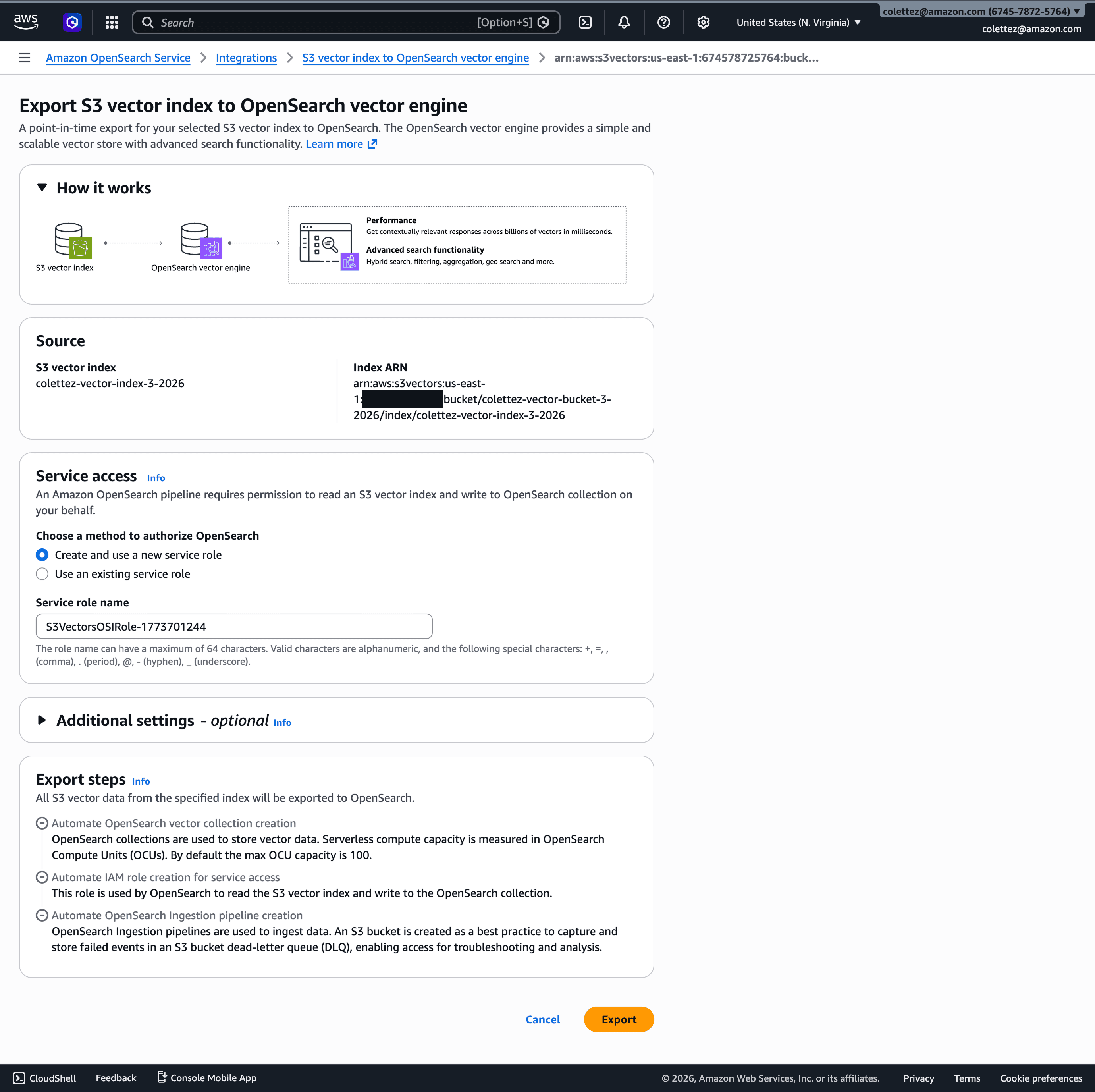
The core interaction is deceptively simple: from within the S3 Vectors console, you choose Advanced search export, then Export to OpenSearch. amazon Two clicks to initiate a promotion from cold vector storage to a live kNN index.
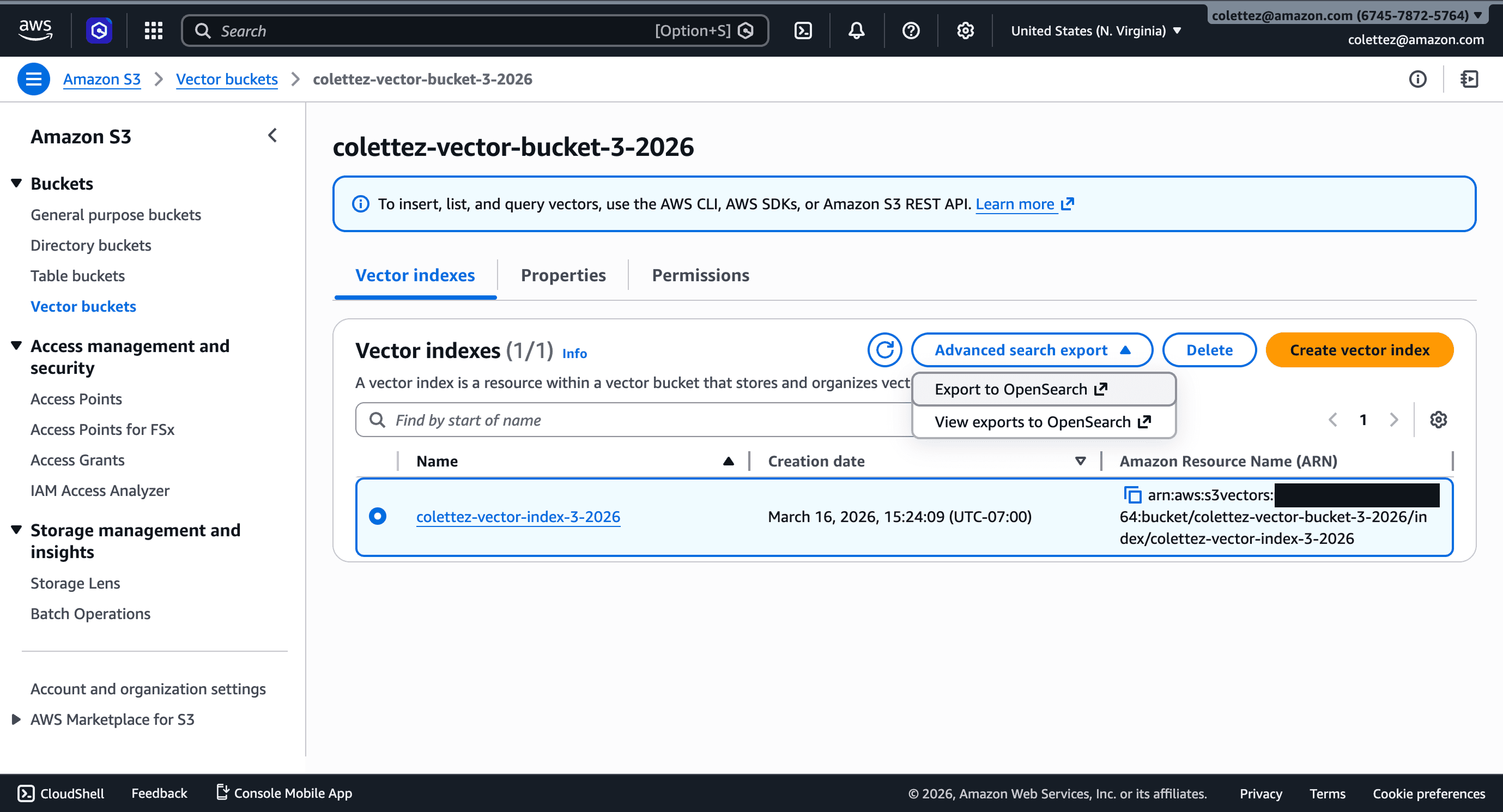
This hands off to the OpenSearch Service Integration console, which pre-populates the source (your S3 vector index) and service access role, then automatically provisions an OpenSearch Serverless collection and migrates the data into an OpenSearch knn index. The infrastructure complexity disappears behind a single Export button.
The decision to surface this inside the S3 console — not the OpenSearch console — was intentional. The mental model starts with your data, not your query engine.
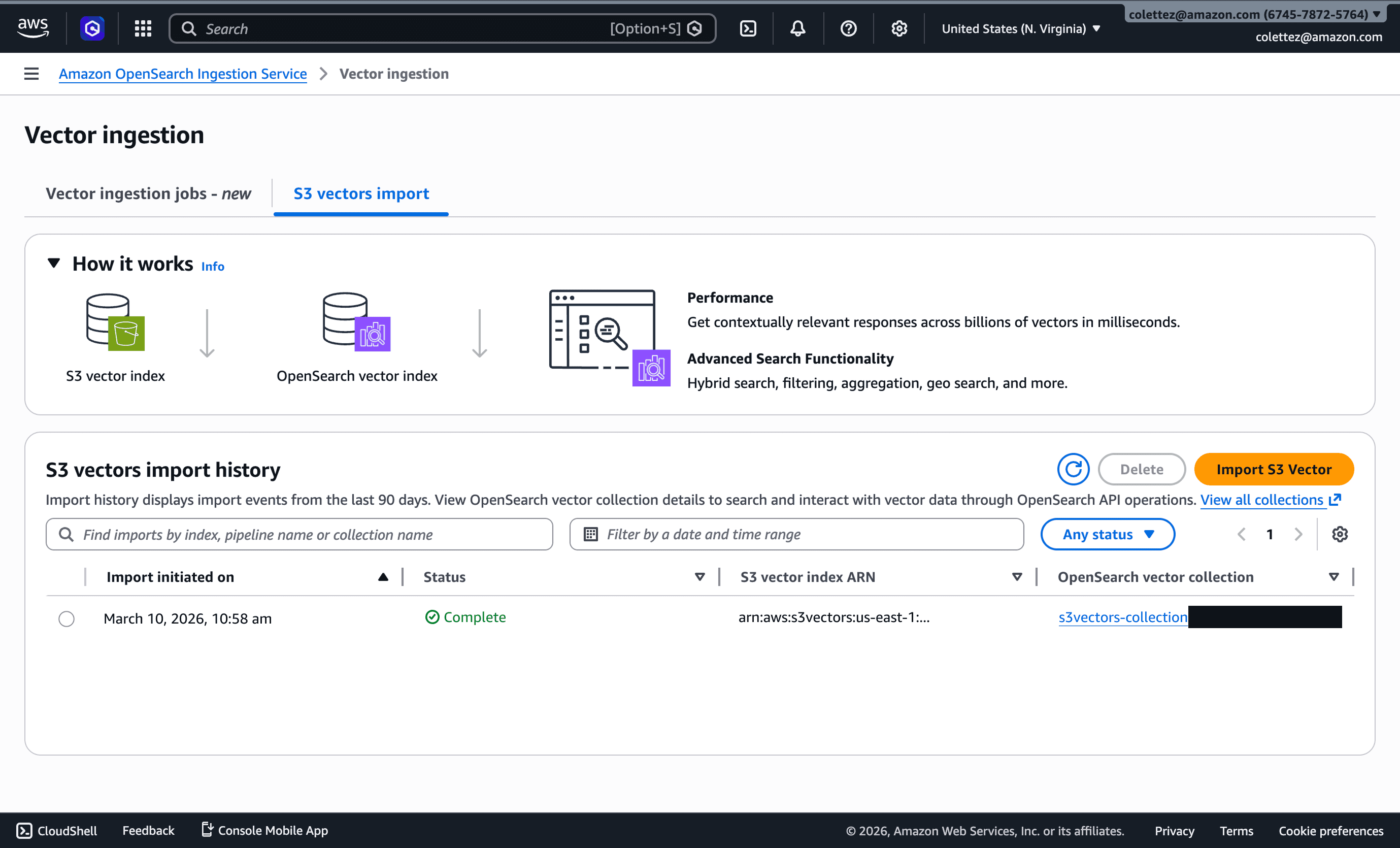
The Import history view gives teams a progress trail and audit record, which matters in regulated environments where data movement needs to be traceable.
What is next?
CURRENT LIMITATIONS
The export is a one-time copy with no live sync. There's no way to move data back when it cools down. And nothing tells you when to export — that's still a manual judgment call.
THE FUTURE
S3 is eventually getting native semantic search. When that ships, the OpenSearch export becomes a niche escape hatch rather than the default path. This feature is a bridge — and a first step toward S3 becoming a place you search, not just a place you store.
RETROSPECTIVE
Open Questions I'm Still Thinking About
HOW SHOULD THE CONSOLE HANDLE MULTI-MODAL VECTORS?
As customers start storing image, text, and audio embeddings in the same bucket, the current index-level metadata model may not scale. Should the console surface embedding type as a first-class filter, or keep it as metadata?
CAN WE SURFACE QUERY PERFORMANCE INSIGHTS DIRECTLY IN THE CONSOLE?
Currently, users need CloudWatch to understand query latency and recall quality. Embedding lightweight analytics into the console (similar to DynamoDB's capacity visualizations) could close a significant feedback loop.
WHAT HAPPENS WHEN AI AGENTS ARE THE PRIMARY CONSOLE USERS?
As trajectory of AI coding assistants continues, the S3 console may need to serve both human users and AI agents that configure infrastructure. How should the UI adapt—or should we invest more in the API/CLI experience instead?
WORDS ARE DESIGN DECISIONS TOO
Copy shapes user perception just as much as layout does — often before a single click happens.
COMPLEXITY BELONGS TO THE SYSTEM NOT THE USER
A clean design experience can do more invisible work for the user.
SHIP EARLY, LEARN FAST
Real preview usage gave better signal in four months than any amount of internal iteration would have.