
AMAZON WEB SERVICES · S3 CONSOLE
TL:DR
Amazon S3 added automatic data integrity checks to file uploads. I designed the console experience for two releases, turning a complex technical feature into a straightforward set of form controls.
ROLE
Lead UX designer
TEAMS
S3 (Simple Storage System)
TIMELINE
Apr 2024 — Sep 2025
Launch 1: General purpose + Directory Buckets
Launch 2: Batch Operations
SCOPE
UI/UX Design
Information Architecture
Rapid Prototyping
OVERVIEW
Amazon S3 stores exabytes of customer data, yet a persistent failure mode went largely unnoticed: files could be silently corrupted in transit between applications and storage, with no indication anything went wrong.
The team's insight was that an opt-in setting would reach only the most security-conscious customers. Making integrity protection the default would protect everyone.
S3 Data Integrity solved this by automatically computing and validating a checksum on every upload — no configuration required. I defined the console interaction model, worked through technical constraints with engineering, and drove the design across formal design reviews.
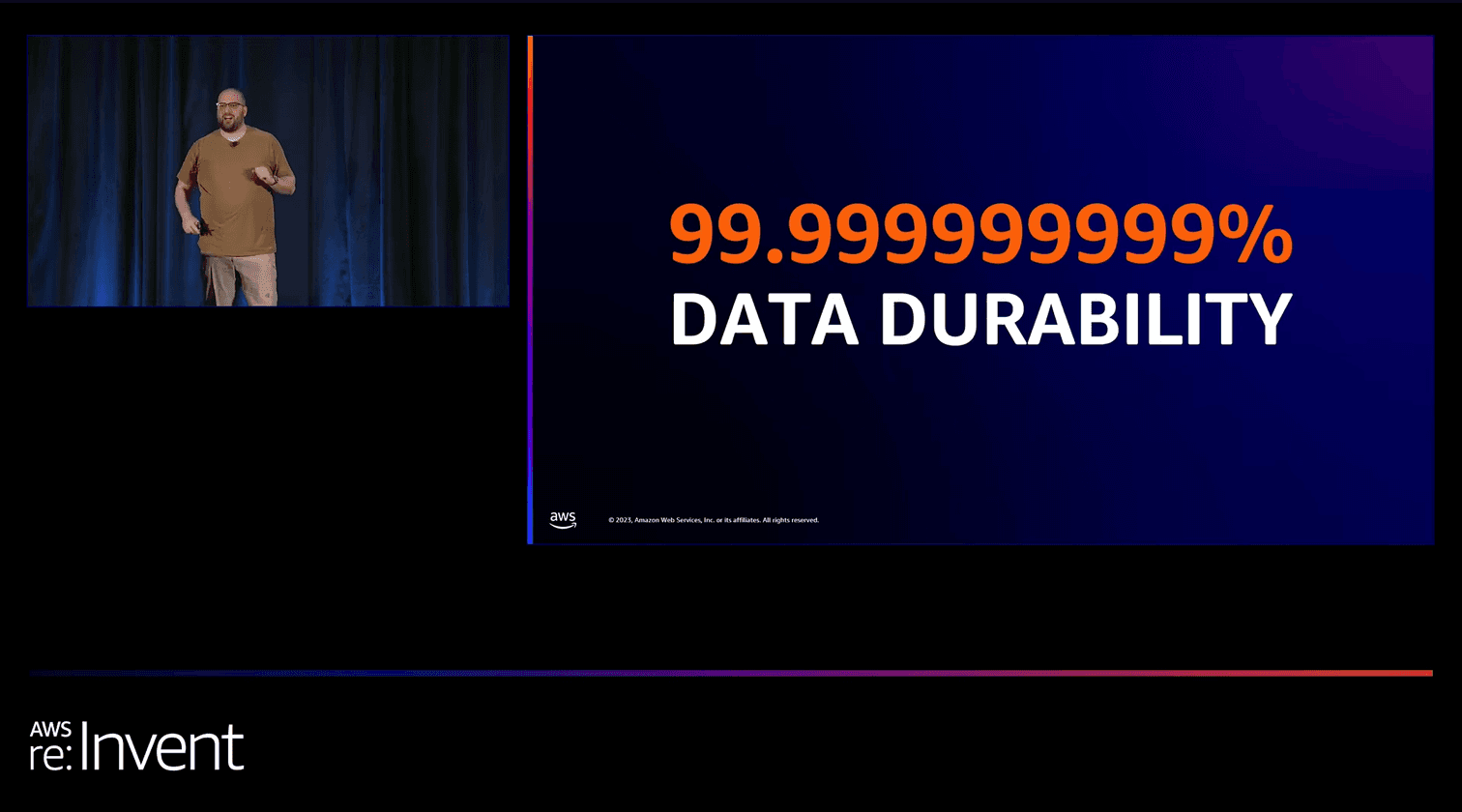
1.0 Image from Re:Invent 2025
IMAGE
THE GOAL
Data stored on drives can fail or corrupt bits at rest
S3 customers trust that the data they upload is the exact data they'll retrieve — even years later, across millions of operations. Our mission was to make silent corruption structurally impossible, not just unlikely.
TARGET DURABILITY — ELEVEN 9s
99.999999999%
That's less than one object lost per 10 billion objects stored per year. Achieving this requires integrity verification at every single layer.
How can we achieve the highest data durability, the eleven 9s (99.9999999%) ?

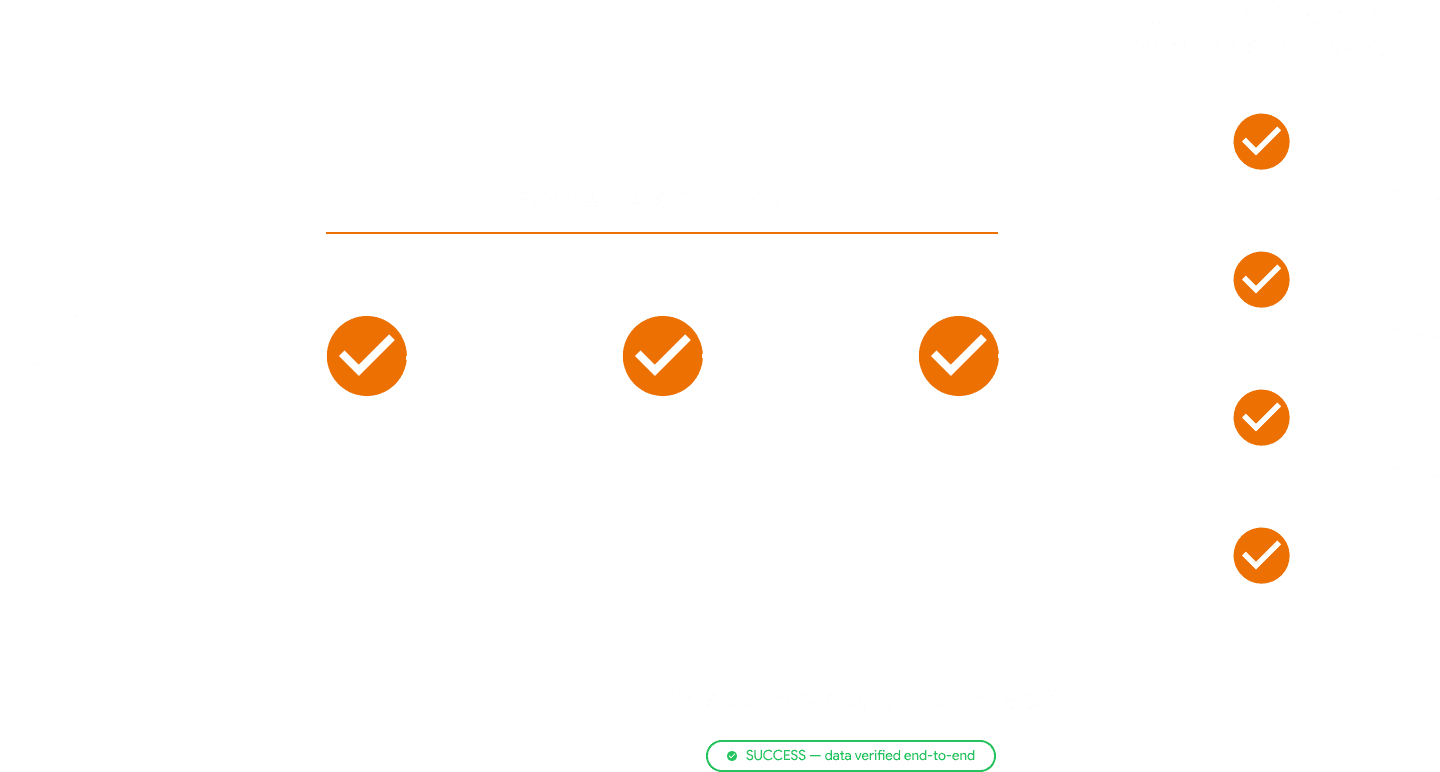
End-to-end integrity checking of request

Data always stored on redundant devices

Periodic durability auditing for data at rest
HOW IT WORKS
End-to-end integrity checking
In Amazon S3, checksums are utilized to ensure data integrity during storage and transfer processes. Think of checksums as digital fingerprints used to ensure that the customer's data remains intact.When the customer upload or move data, S3 calculates this fingerprint. Later, it compares this with the original one to make sure nothing changed during the process, ensuring the customer’s data stays safe and unaltered.
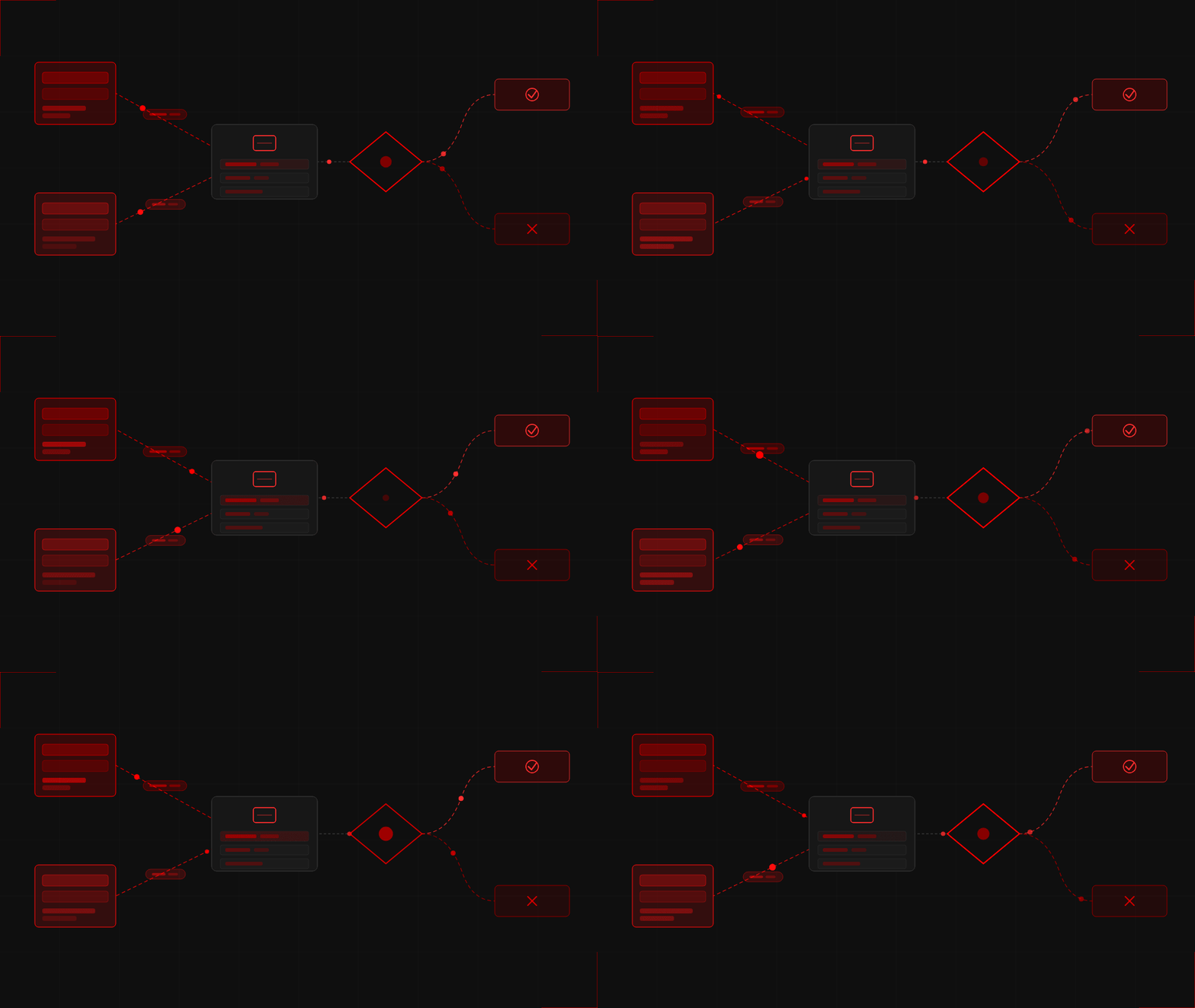
Every upload is checksummed at the client, verified at each relay point, and compared again when stored. A success banner is only returned after full round-trip validation.
RESEARCH DISCOVERY
Listening to where the system was failing customers
We didn't start with a solution — we started with signals. Two parallel research tracks converged on the same conclusion: customers were shouldering integrity burden that should have been invisible.
CUSTOMER INTERVIEWS & SUPPORT TICKETS
Customers were building their own safety nets
Support tickets revealed a recurring pattern: enterprise customers were writing custom scripts to verify multi-part upload integrity after the fact. They didn't trust the per-part checksum model to catch corruption across the full object.
INTERVIEWS & SUPPORT TICKETS
The industry was raising the bar
Competing cloud storage providers had already begun offering automatic full-object checksums on upload. Our gap wasn't just a missing feature — it was becoming a trust differential that enterprise buyers were factoring into procurement decisions.
PROBLEM SPACE
Multi-part uploads had a critical gap
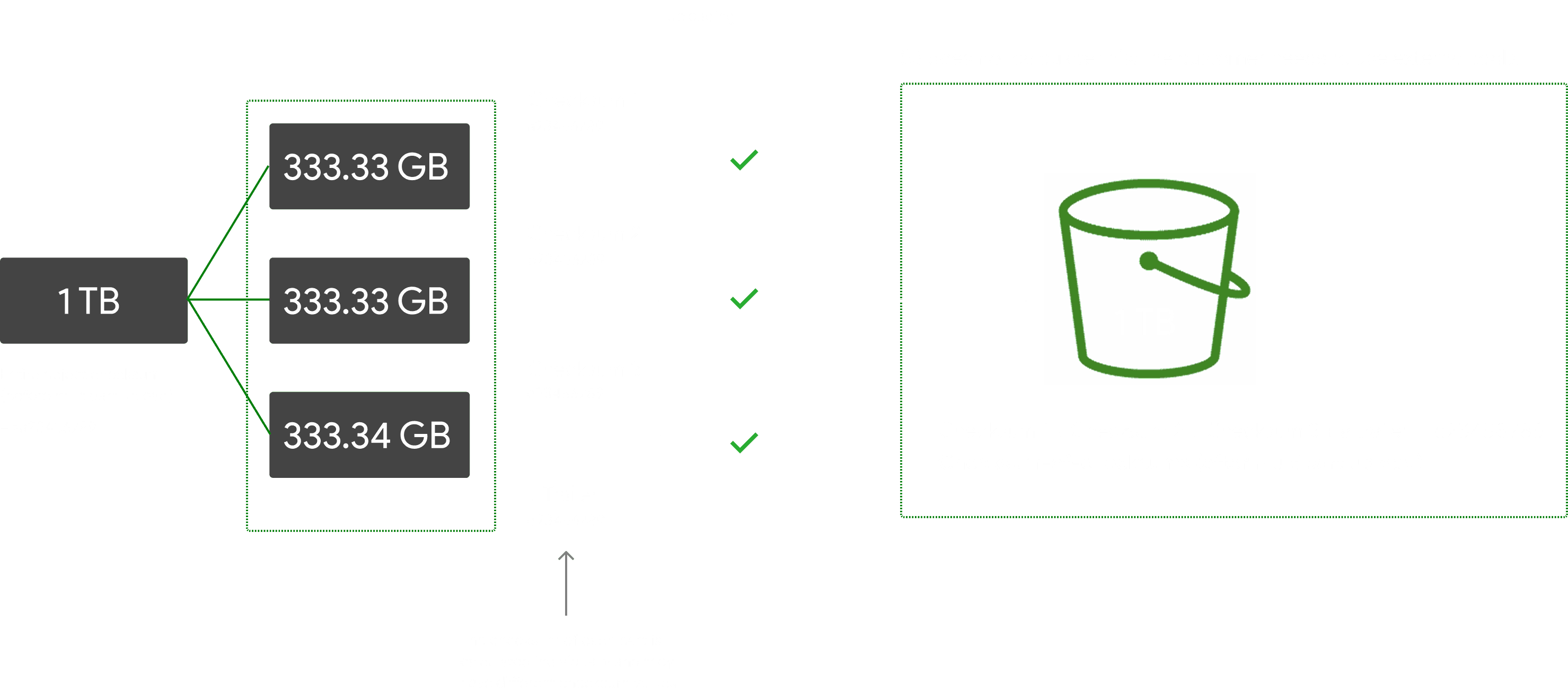
Currently, in S3's multi-part upload, the object integrity check only calculates checksums for individual parts, not the entire object, resulting in a mismatch between the overall object checksum and the checksum-of-checksums (a combination of checksums for each individual part with a trailer).
The S3 console does not calculate the checksum-of-checksum by default. Consequently, customers need to build custom tooling to compute the checksum-of-checksums, introducing unnecessary complexity.
THE OPPORTUNITY
Surfacing checksum selection in S3
How can I introduce a data-integrity feature into the S3 console and SDK that serves three very different user mindsets at once?
Zero friction
Customers who just want protection shouldn't have to take any action — it should work by default.
Power path
Users with pre-computed checksum values need a clear, direct way to provide them.
Reduce confusion
Some customers have never thought about checksums — the UI can't break their mental model.
SCOPE
Two launches, two design problems
Launch 1 · re:Invent 2024
Checksums in General Purpose & Directory Buckets PUT operations
Wire-integrity protection at the moment of upload. Every PUT from an AWS SDK or console automatically computes and validates a CRC checksum before durably storing the object. No customer opt-in. No code change needed for most customers.
Console upload UI: algorithm selection + optional pre-computed value field
MPU (MultipartUpload): full-object checksum type toggle — the hardest UI problem
Launch 2 · 2025
Batch Operations: Compute Checksum
At-rest integrity verification for existing datasets — without downloading or restoring objects. Customers in media, healthcare, and financial services run periodic fixity checks. Previously this required downloading billions of objects. Now it's a job request.
New operation type in Batch Ops job creation wizard
Algorithm + checksum type selection (full object vs. composite)
DESIGN DECISIONS
Three decisions that shaped the product
01
Should we show all six algorithms upfront, or hide them behind the default?
REJECTED — V1 RADIO LIST
All algorithms as radio buttons with inline descriptions
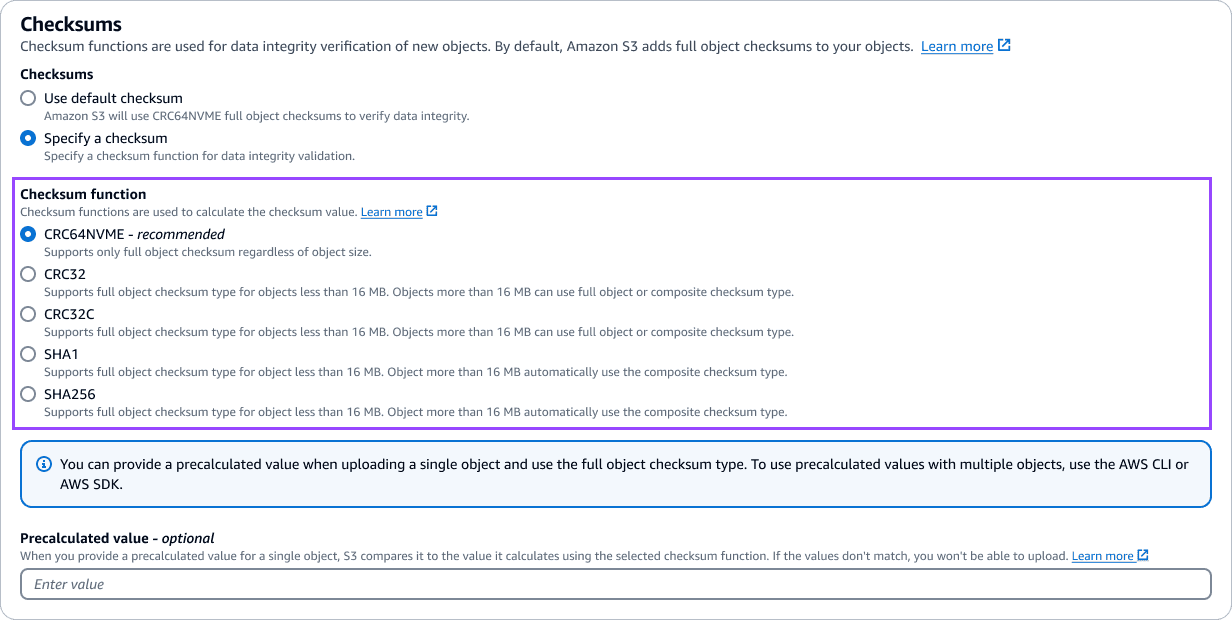
CRC64NVME, CRC32, CRC32C, SHA-1, SHA-256 displayed as a vertical radio list. Each option included 2–3 lines describing object-size thresholds and composite vs. full-object support. This was the initial V1 design.
CHOSEN — V2 DROPDOWN
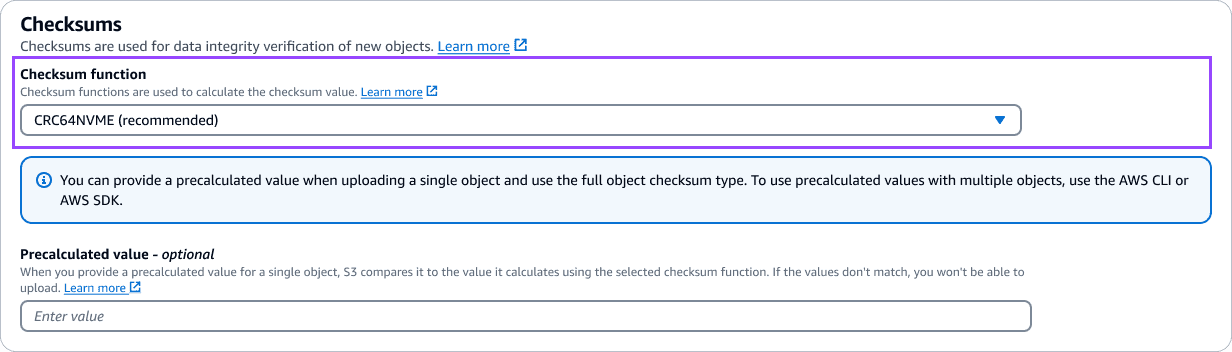
Collapsed dropdown with "CRC64NVME (recommended)" pre-selected
Default state is collapsed, showing only the selected value. Expanding reveals all algorithms with one-line descriptions. Full documentation lives behind "Learn more" links, not in the form itself.
TRADEOFF
Power users lose at-a-glance algorithm comparison. But the radio list added ~200px of height and information density to the upload page, overwhelming the users who should use the default. the dropdown achieved zero clicks for the happy path while keeping full control one click away.
02
Where should checksum type (full-object vs. composite) live in the multipart upload flow?
REJECTED — MANUAL TOGGLE
Separate "Checksum type" section with radio buttons
Add a dedicated radio group below the algorithm dropdown for "Full object" and "Composite" — each with explanatory text about when to use which type and how multipart boundaries affect the value.
CHOSEN — SYSTEM DETERMINED
Auto-derive from algorithm + object size; show as read-only context
Objects <16 MB always use full-object checksum. Larger objects show the checksum type as read-only context with an info alert explaining composite calculations. The system makes the right choice; the UI confirms.
TRADEOFF
Users can't force composite on small objects (edge case). But private preview customers unanimously said "just pick the right one." Removing this fork eliminated the most confusion-inducing concept in the flow.
03
For Batch Operations Compute Checksum — reuse the upload pattern or design a new one?
REJECTED — EXACT REUSE
Port the upload dropdown directly into the Batch Ops wizard
Same component, same surrounding context. Assume the upload-page mental model transfers directly to batch-scale operations processing billions of objects.
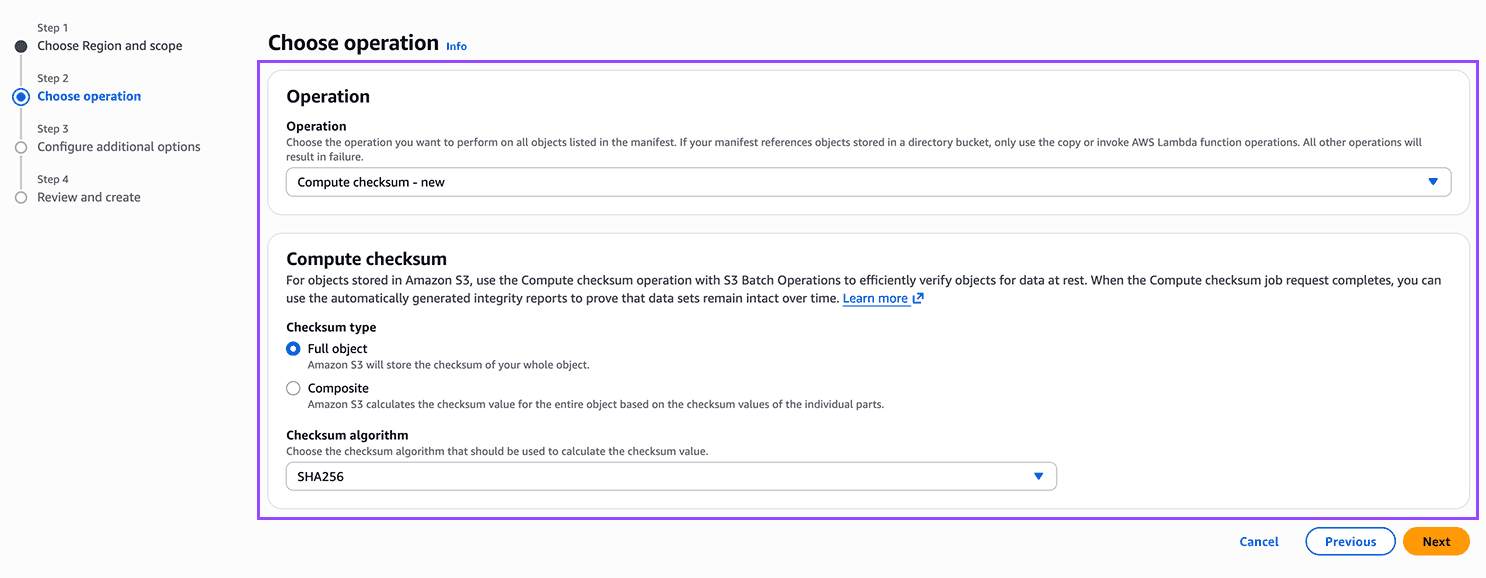
CHOSEN — SHARED COMPONENT
Same dropdown component wrapped in batch-specific constraints
Reused the same checksum dropdown from upload flows, wrapped inside batch operation context. At billion-object scale, letting users choose ensures they can match the verification method to their existing workflows or compliance requirements.
TRADEOFF
Two checksum selection flows to maintain across launches. But batch users (ops engineers verifying billions of objects at rest) have fundamentally different needs than console uploaders (devs testing single files). Matching control depth to operational scope was worth the maintenance cost.
HIGHLIGHT
Launch 1 — General Purpose & Directory Buckets
What I Shipped
Default CRC64NVME checksum protection for every new object uploaded via the S3 Console, SDKs, and CLI. Launched at AWS re:Invent 2024, rolling out to all regions including GovCloud and China. I designed the S3 object upload checksums section, object properties read-only display, copy operation checksum selection.
UPLOAD FLOW - HAPPY PATH (ZERO CLICKS FOR CHECKSUMS)
Select files
Checksums: Default ✓
Upload
Checksum: CRC64NVME · Full object · ✓ Verified
Collapsed-by-default
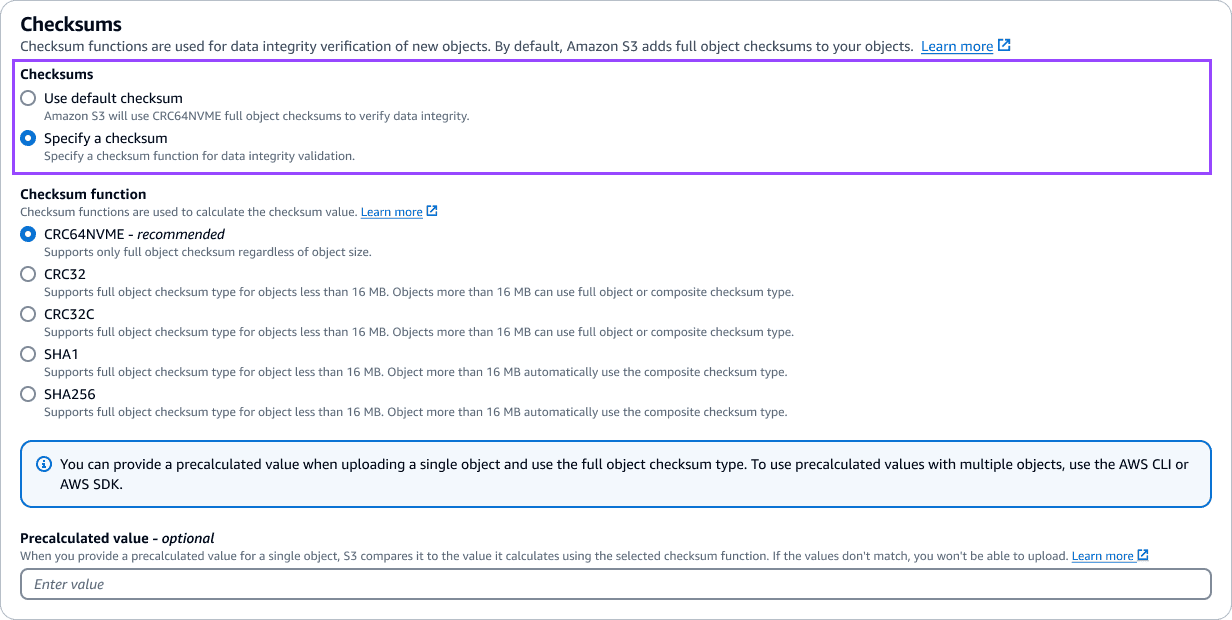
"Use default checksum" pre-selected. "Specify a checksum" expands the algorithm dropdown and precalculated value input only on demand.
V1 — Specify a checksum in upload (Radio List)
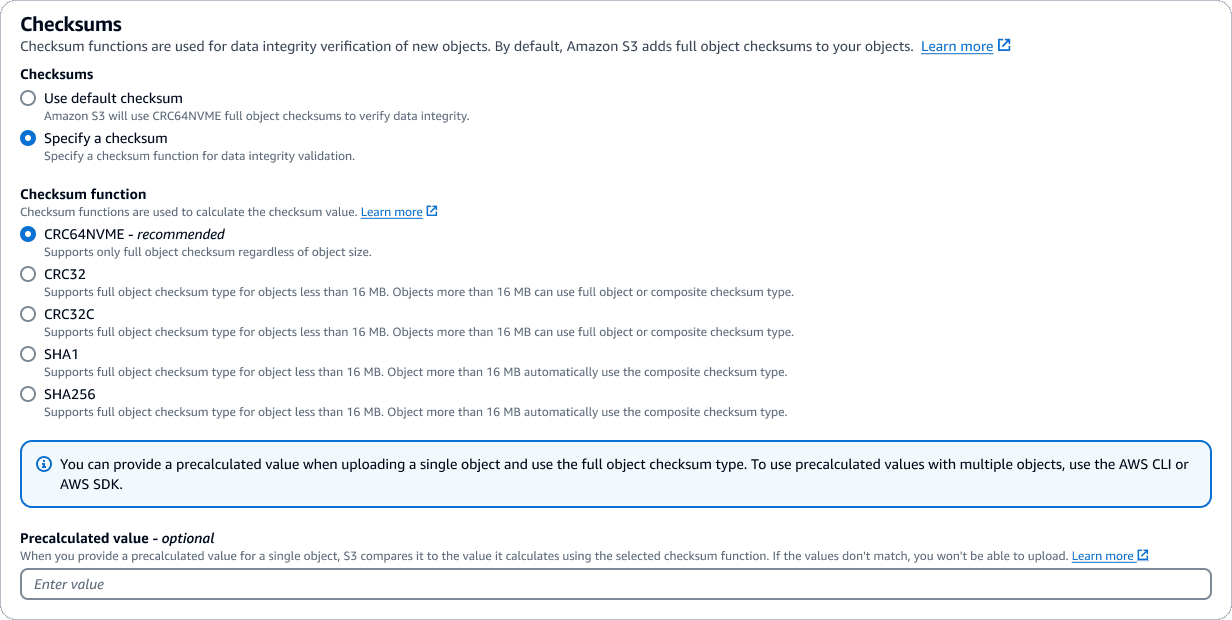
~340px tall, 5 radio buttons, inline descriptions
V1 used radio buttons with inline algorithm descriptions — tall page section, high cognitive load
V2 — Specify a checksum in upload (Dropdown)
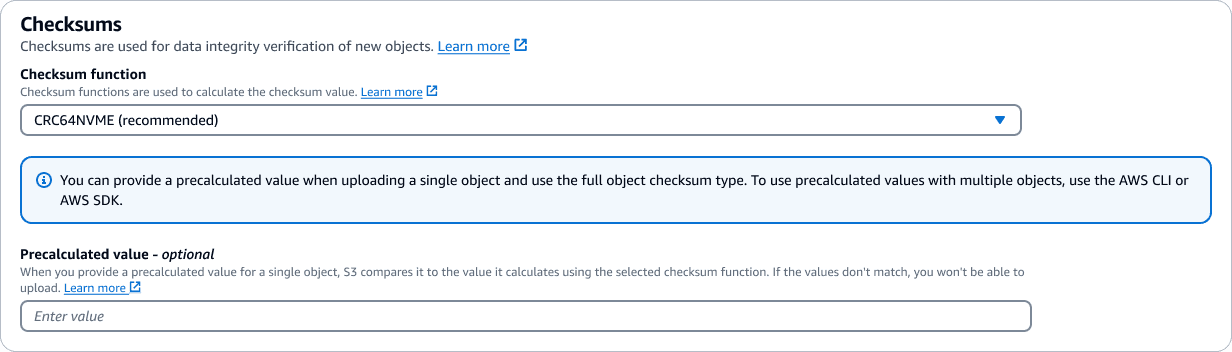
~200px tall, 1 dropdown, description in the info panel
V2 collapsed to a dropdown with "(recommended)" suffix, reducing section height ~60%. Added SHA-1/SHA-256 support. Rationale: reduce clicks, promote CRC64NVME, move descriptions to dropdown description
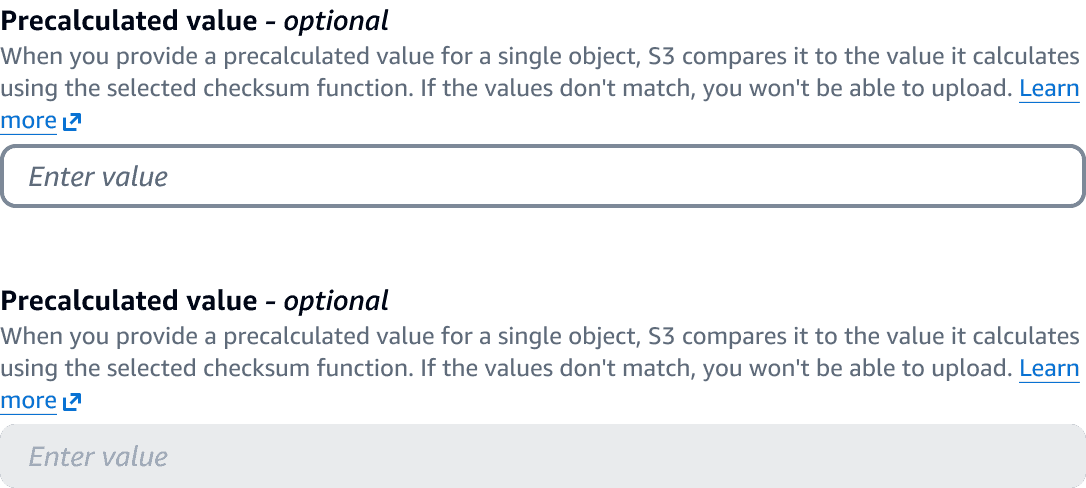
Active state (top) vs. disabled state (bottom).
Validation rules visible below input: base64 encoded, max 128 chars.
S3 compares client-provided value to its own server-side calculation; mismatch = upload rejected (BadDigest error).
The Multipart Upload Problem
Multipart uploads introduce a choice unique to S3: full-object vs. composite checksums. These behave differently downstream, so hiding the option wasn't an option. But exposing it to everyone would confuse the vast majority of customers who've never heard of a composite checksum.
The Solution: A Conditional Toggle
I designed a three-state component — not a simple on/off — that adapts based on the selected algorithm:
CRC64NVME (default): Toggle hidden. Defaults to full-object silently.
SHA-1 / SHA-256: Toggle hidden. Defaults to composite silently.
CRC32 / CRC32C: Toggle visible, with a one-line explanation of each type.
The simpler engineering path was to always show the toggle. I pushed back because surfacing it on the default algorithm would make "zero-click protection" feel like it required a decision — undermining the core design principle of the entire feature.
Default

CRC64NVME, composite disabled — only full object supported, only support objects less than 16 MB
SHA-1 / SHA-256
SHA algorithms, full object auto-selected for objects less than 16 MB, composite auto-selected for objects greater than 16 MB
CRC32 / CRC32C
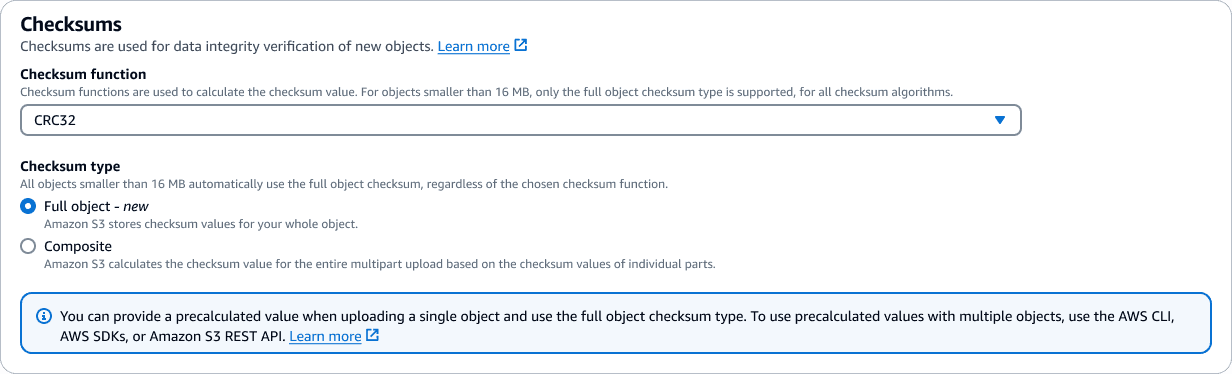
CRC32/32C algorithms, full object auto-selected for objects less than 16 MB, composite auto-selected for objects greater than 16 MB
The result: 90%+ of users never see the toggle at all. The few who need it get just enough context to choose confidently.
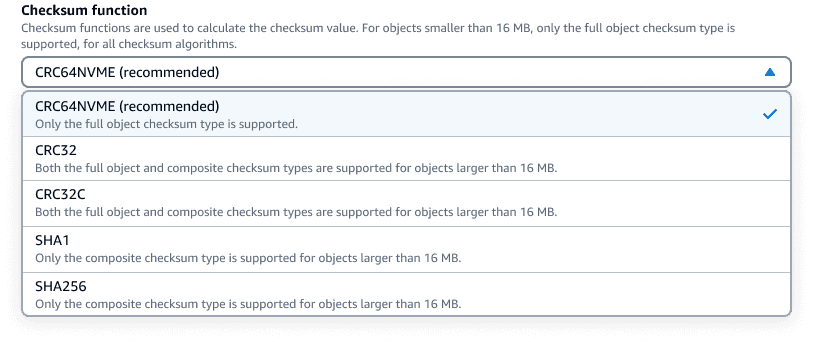
Descriptions live inside the dropdown — each algorithm behaves differently, so the explanation appears at the moment of choice. No tooltips, no docs detour.
The "(recommended)" label is parenthetical and lowercase, matching existing console patterns. A prominent badge would invite doubt about the other options.
Checksum type is read-only. The system picks the right type automatically. Showing it as non-editable text signals "handled for you," not "you missed a setting."
Read-only confirmation row
After upload, object properties show checksum function, type, and value in a compact three-column row — proving integrity without prior setup.

Copy/Move operation inheritance
"Copy existing checksum function" as default, with option to replace — respecting existing workflows.
COPY/MOVE FLOW - HAPPY PATH (ZERO CLICKS FOR CHECKSUMS)
Select files
Checksums: Copy existing checksum ✓
Copy/Move
Checksum: CRC64NVME · Full object · ✓ Verified
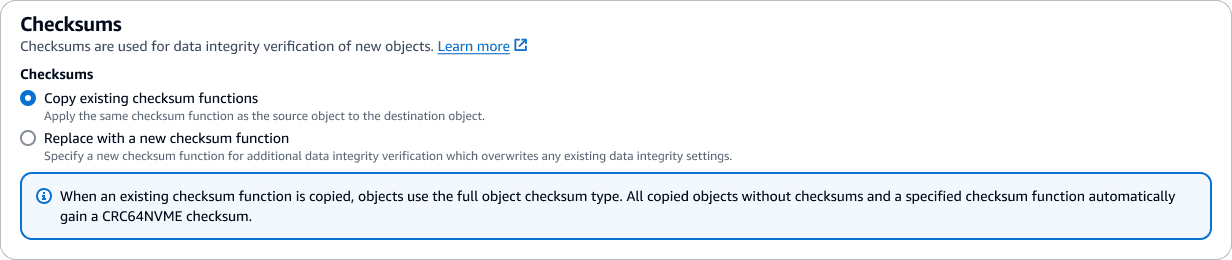
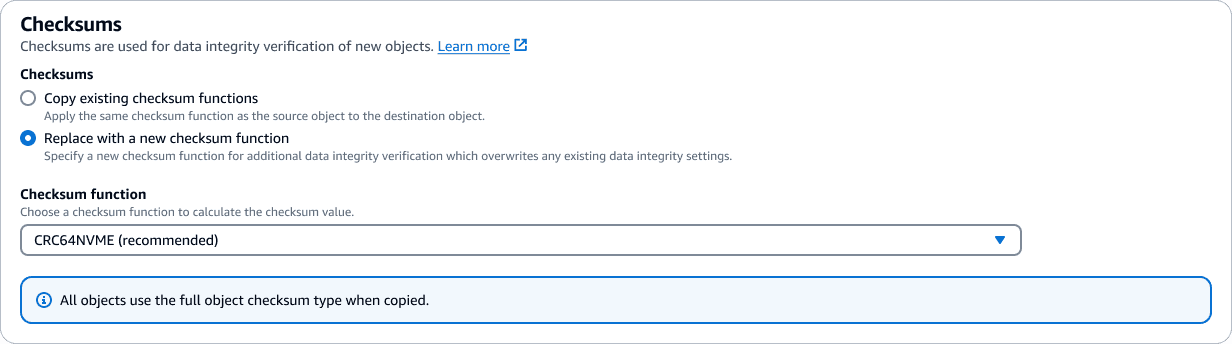
"Copy existing checksum functions" pre-selected — zero-click integrity. "Replace with a new checksum function" expands the algorithm dropdown and precalculated value input only when explicitly chosen.
Launch 2 — Batch Operations
What I Shipped
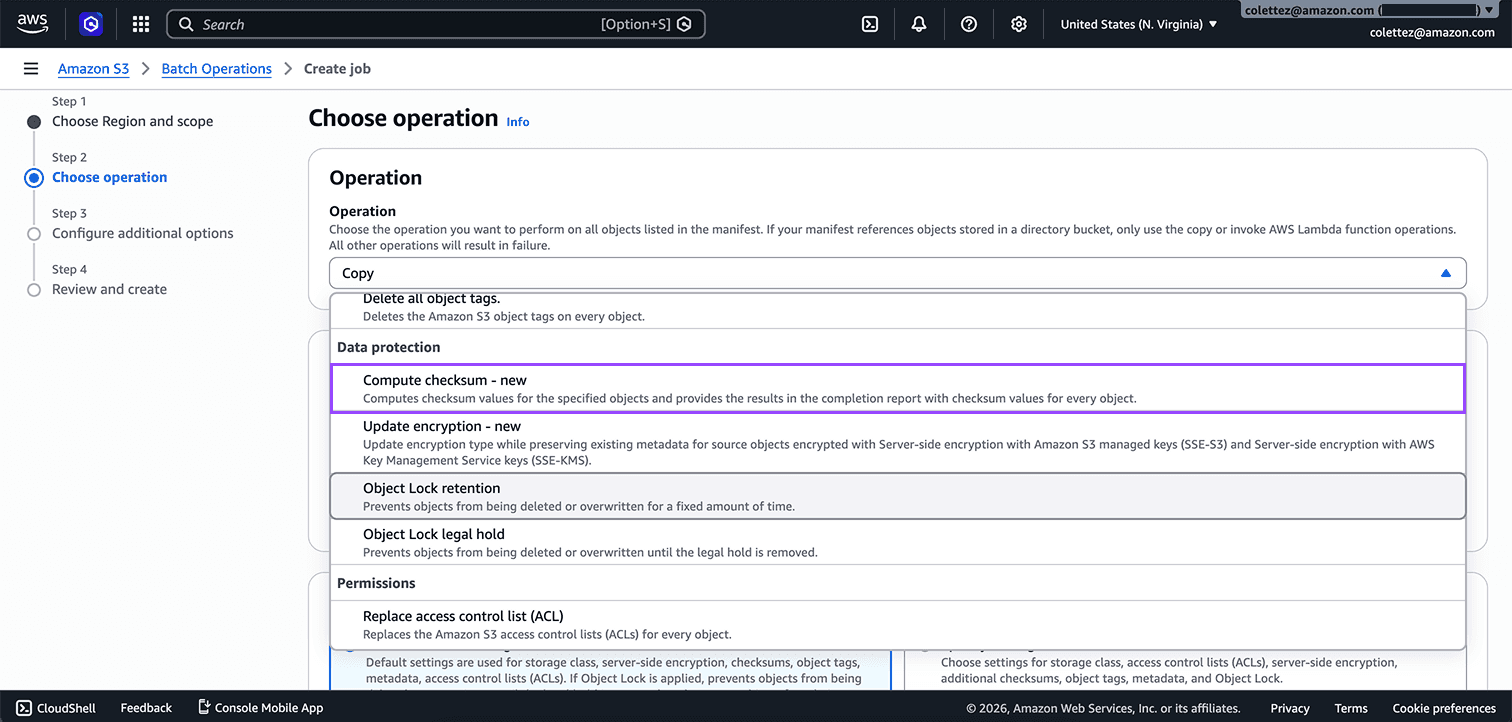
S3 Batch Operations lets customers run jobs across millions of objects at once. "Compute checksum" is a new operation I designed that adds checksum verification to objects already at rest — closing the gap for customers who uploaded data before checksums were default. Shipped in 2025.
BATCH COMPUTE CHECKSUM — JOB CREATION FLOW
Choose manifest
Operation: Compute checksum
Algorithm + type
IAM role + bucket
Review & Create
Operation type as entry point
"Compute checksum" appears in the Data protection group. Selecting it reveals checksum-specific configuration.
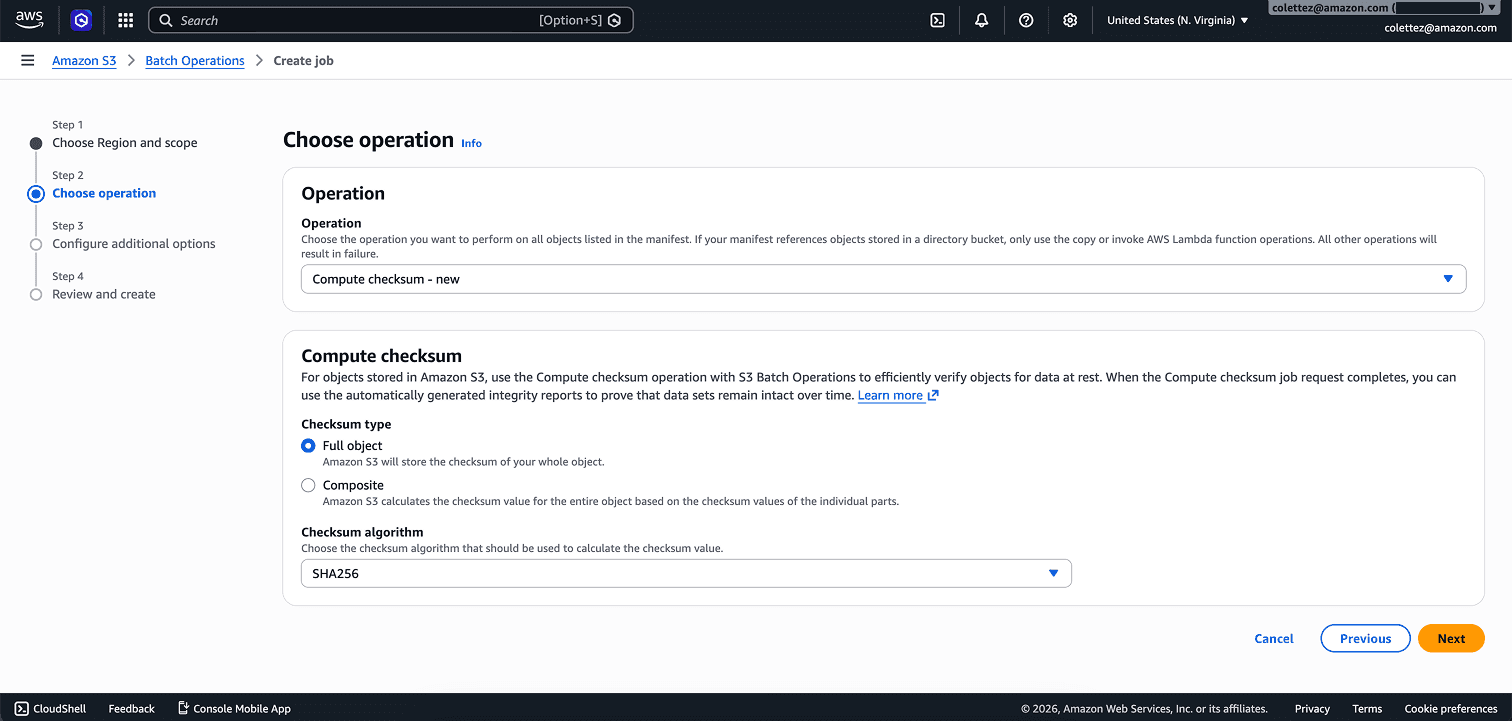
Checksum type leads, algorithm follows
Unlike the upload flow — where checksums are an add-on to another action — here compute checksum is the operation. So the configuration foregrounds the full-object vs. composite choice first, then algorithm. The hierarchy matches intent: what kind of verification, then how to compute it.
IMPACT
S3 default data integrity protections closed every gap and opened new ones:
S3 is now the only major cloud with default-on checksums, full CRC support both in-transit and at rest, and batch verification for stored objects. Azure and GCP each cover only one algorithm partially — neither offers defaults or at-rest verification.
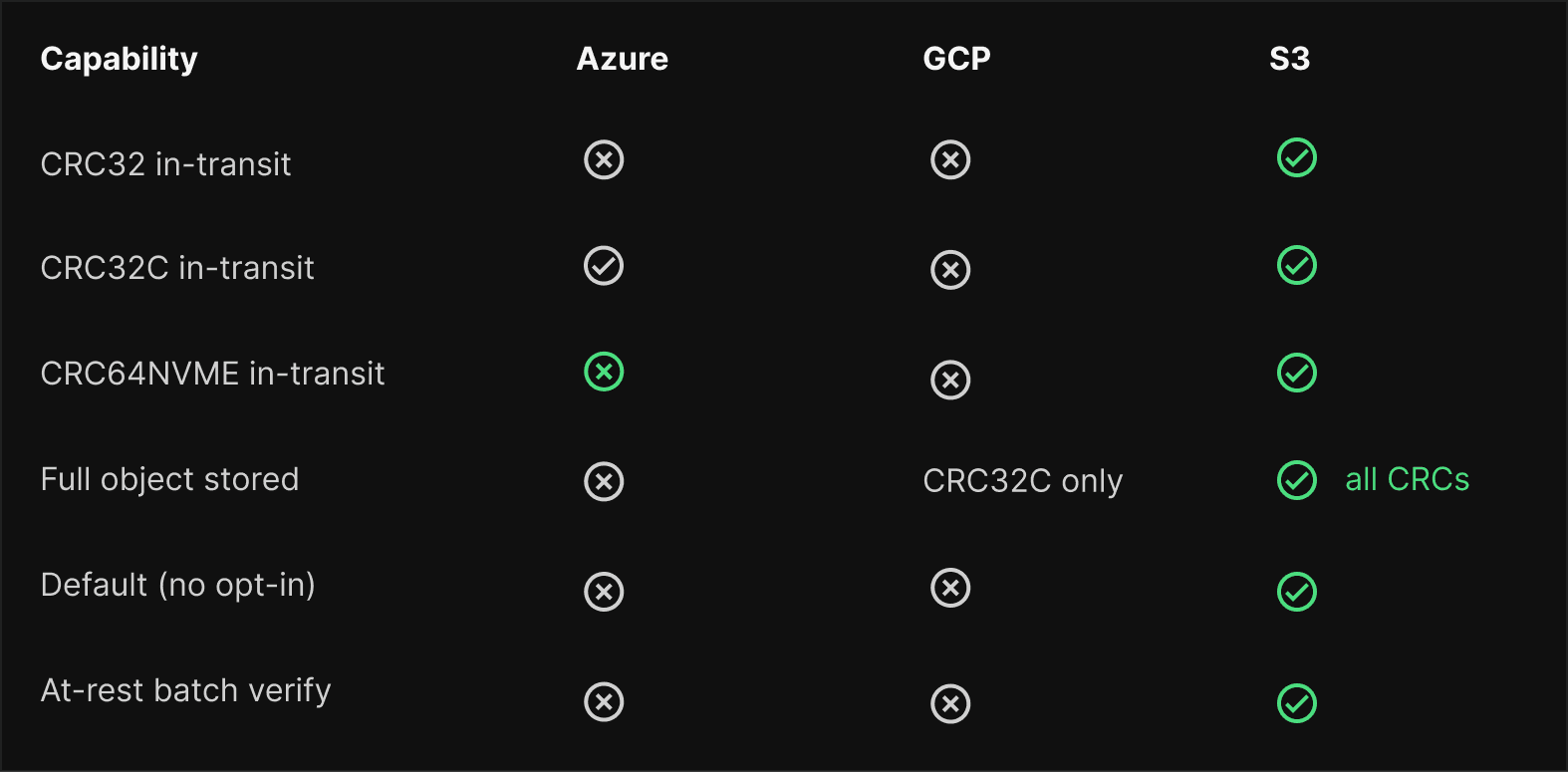
Default checksums launched at re:Invent 2024 and rolled out to all regions including GovCloud and China. Every new object now gets CRC64NVME protection with zero configuration. The console supports all six algorithms. Batch Operations closes the gap for existing data — billions of objects verified in a single job. The design made end-to-end integrity feel effortless: automatic for most customers, configurable for those who need it.
RETROSPECTIVE
Mistakes and recalibrations
THE MD5 LEGACY PROBLEM
Major media companies use MD5 values as permanent asset IDs. The project was scoped around CRC for performance reasons but didn't design for customers who couldn't switch. MD5 computation became a follow-up, it should have been planned from the start.
LAST MINUTE DISCOVERY
Pre-signed URLs don't support checksums — adding a header invalidates the signature. I caught this late via engineering review. It's now a documented known limitation.
TERMINOLOGY COMPLEXITY
"Full object" and "composite" are engineering terms, not user language. I added inline descriptions to bridge the gap. Ideally, I would have run vocabulary testing with users to find clearer labels.
Open Questions I'm Still Thinking About
HOW SHOULD CONSOLE SURFACE INTEGRITY STATUS OVER TIME?
Today, checksums are a static value in object properties. But S3 runs periodic integrity checks at rest. Should there be a "last verified" timestamp? A bucket-level integrity dashboard? The current design treats integrity as point-in-time; customers increasingly want continuous assurance.
WHAT IS THE RIGHT UX FOR THE MD5 DEPRECATION PATH?
MD5 can't produce full-object checksums for large multipart uploads (up to 90 min for 1 TB). Media companies like Warner and Disney have decades of MD5 values embedded in their supply chains. The migration from MD5 → CRC needs to respect that history without blocking progress.
HOW WILL ML TRAINING PIPELINES CHANGE INTEGRITY VERIFICATION PATTERNS?
Training datasets stored in S3 need "this data hasn't drifted since I curated it" verification at massive scale with mixed storage classes. Batch Ops Compute Checksum is a start, but the UX for dataset-level integrity attestation is still undefined.

View Project
Unlocking S3 Conditional Writes
Empowering developers to prevent data overwrites with clarity
☉ LaunchedDeveloper Tool0→1 Design
View Project